

وضاحت
Zen Site Security migrates your WordPress site to HTTPS safely and keeps it there.
One-click activation
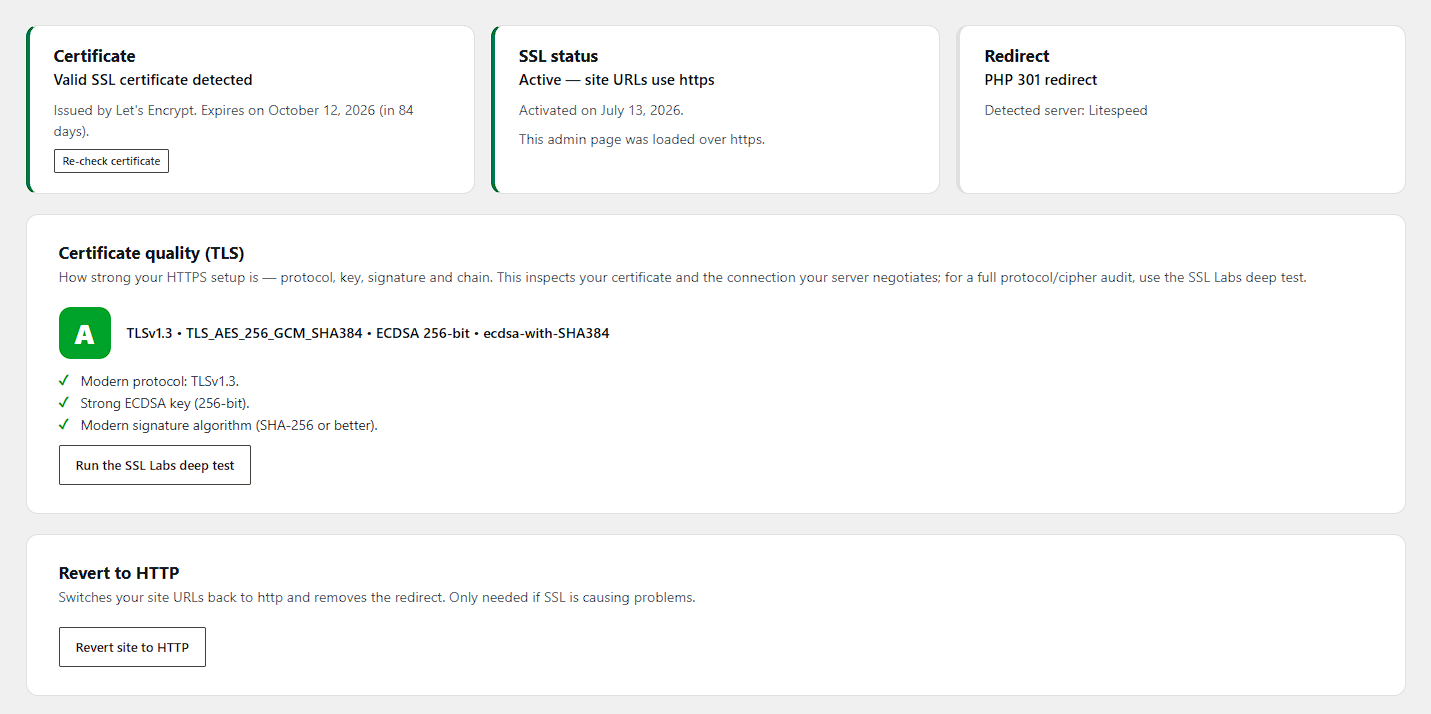
The plugin first verifies that a valid SSL certificate is actually installed for your domain — activation is blocked until one is found, so you can never lock yourself out by accident. Activation then:
- switches your WordPress Address and Site Address to https,
- 301-redirects every HTTP request (pages, REST API) to HTTPS,
- fixes mixed content on your pages on the fly.
HTTP to HTTPS redirect, your way
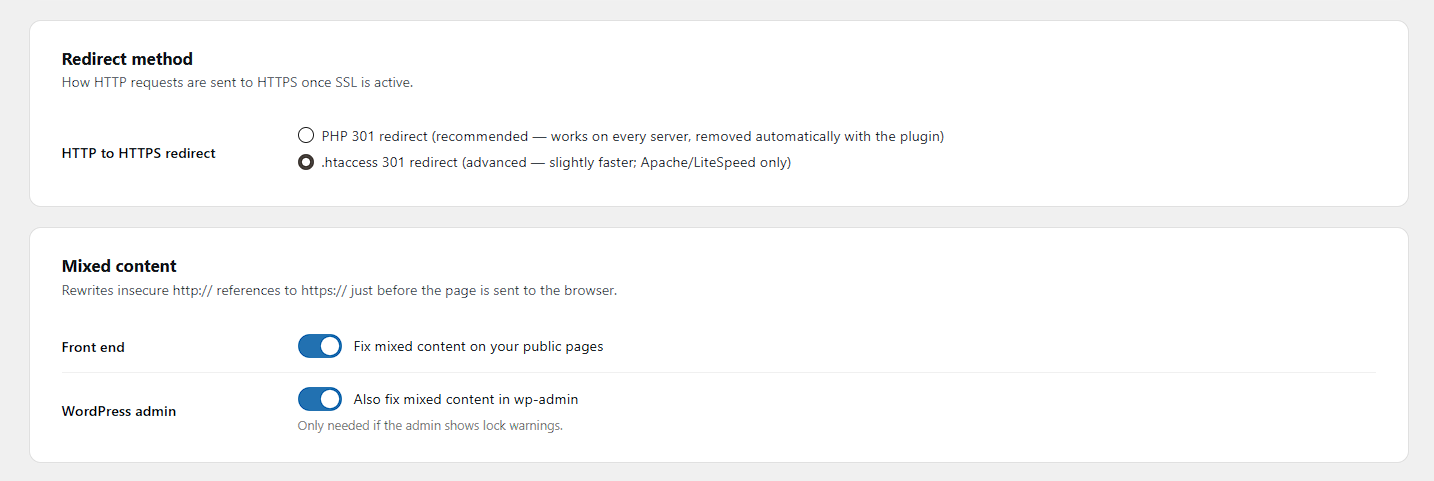
- PHP 301 redirect (default) — works on every server and disappears automatically when the plugin is deactivated.
- .htaccess 301 redirect (advanced, Apache/LiteSpeed) — redirects at server level before WordPress loads, with the PHP redirect kept as a safety net. The rules are placed above the WordPress block, wrapped in clear markers, and removed on deactivation.
- On nginx the plugin shows you the exact server snippet to copy instead.
Mixed content fixer
Insecure http:// references to your own site (including www/non-www variants and JSON-escaped URLs), plus common src, href, action, og:image, url() and srcset patterns, are rewritten to https:// just before the page is sent to the browser. Feeds, sitemaps and JSON responses are left untouched. An optional fixer for the WordPress admin is available too.
Certificate monitoring
The dashboard shows the certificate issuer, expiry date, and whether it covers your domain (wildcards included). When SSL is active and the certificate is about to expire (or already has), administrators see a warning.
HTTP Strict Transport Security (HSTS) — opt-in
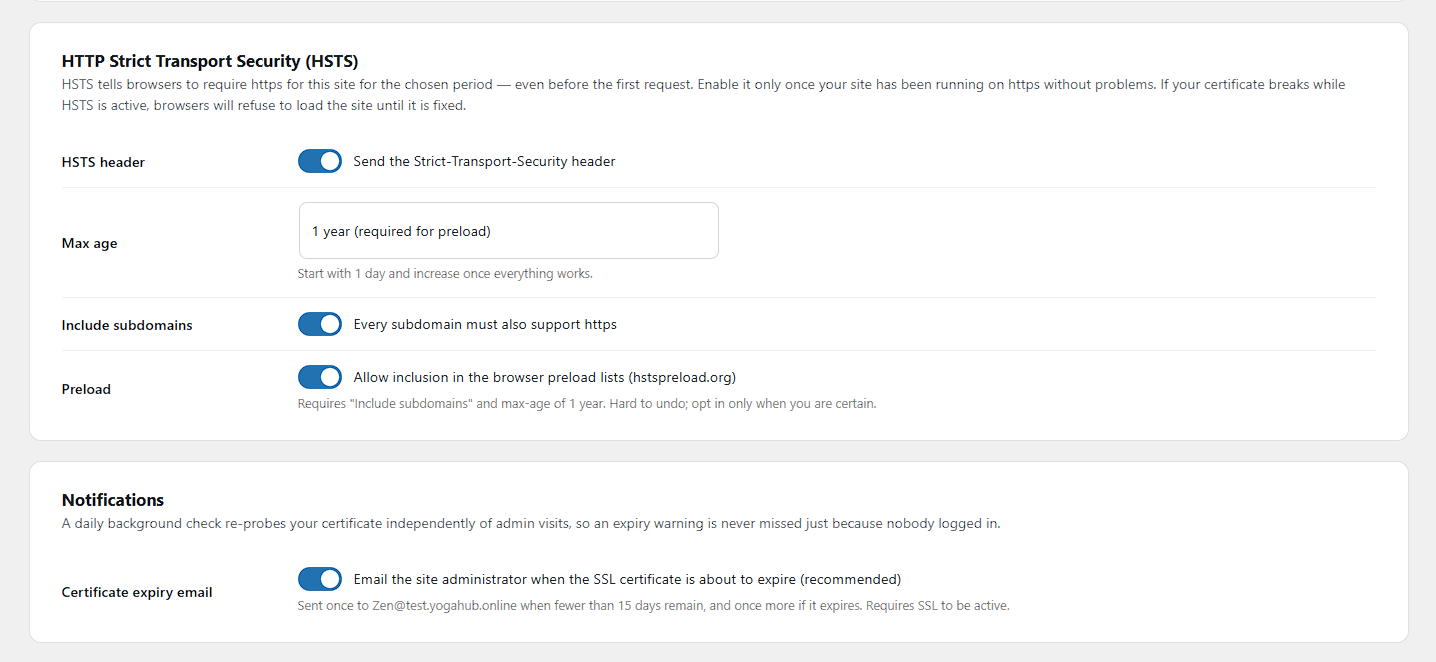
Once your site runs reliably on https, you can send the Strict-Transport-Security header. Max-age starts at one day for safe testing; the preload-eligible configuration (1 year + includeSubDomains) requires explicit opt-in, because it is hard to undo.
Security hardening — XSS, CSRF, and injection defense in depth (all opt-in)
- Security headers:
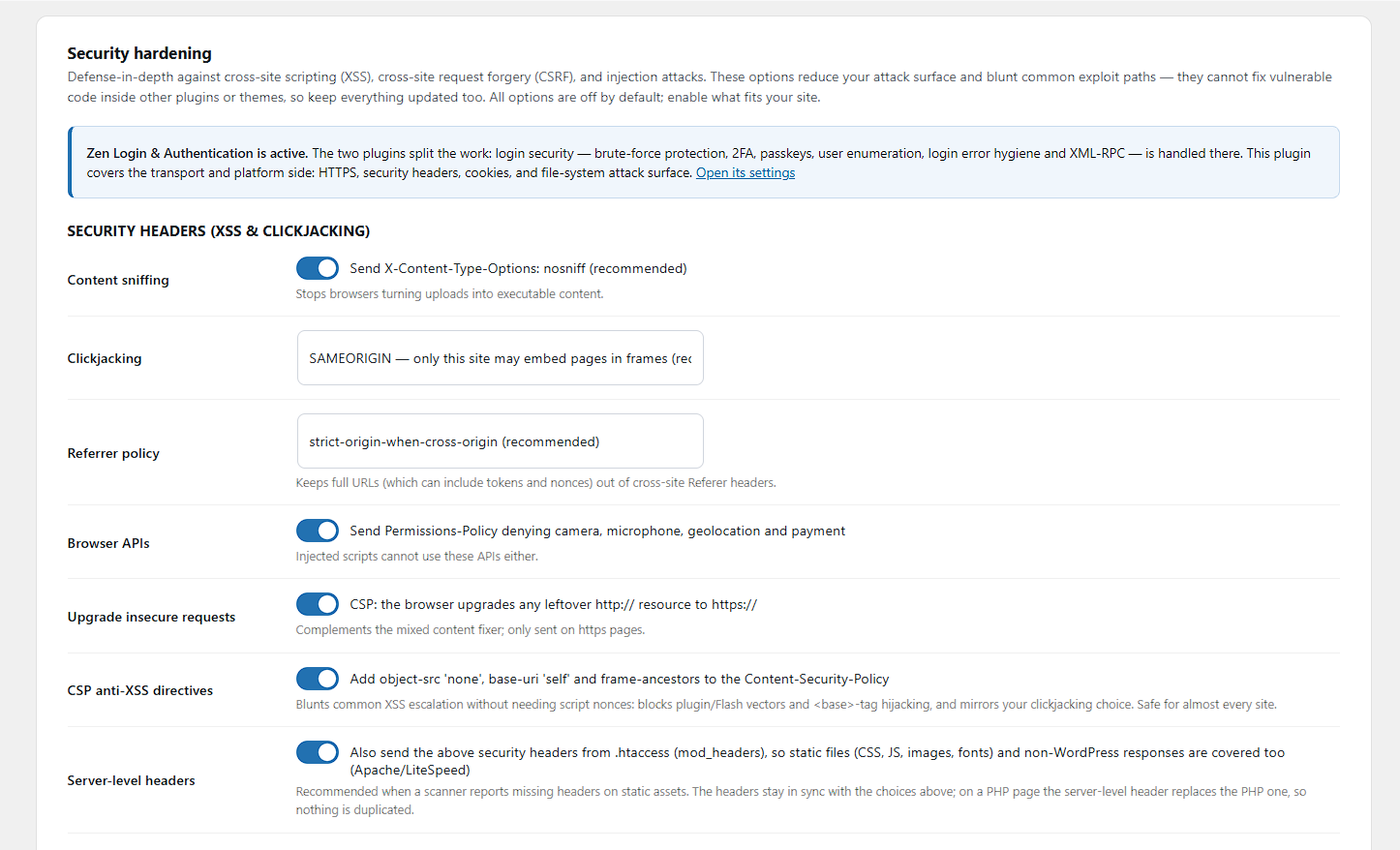
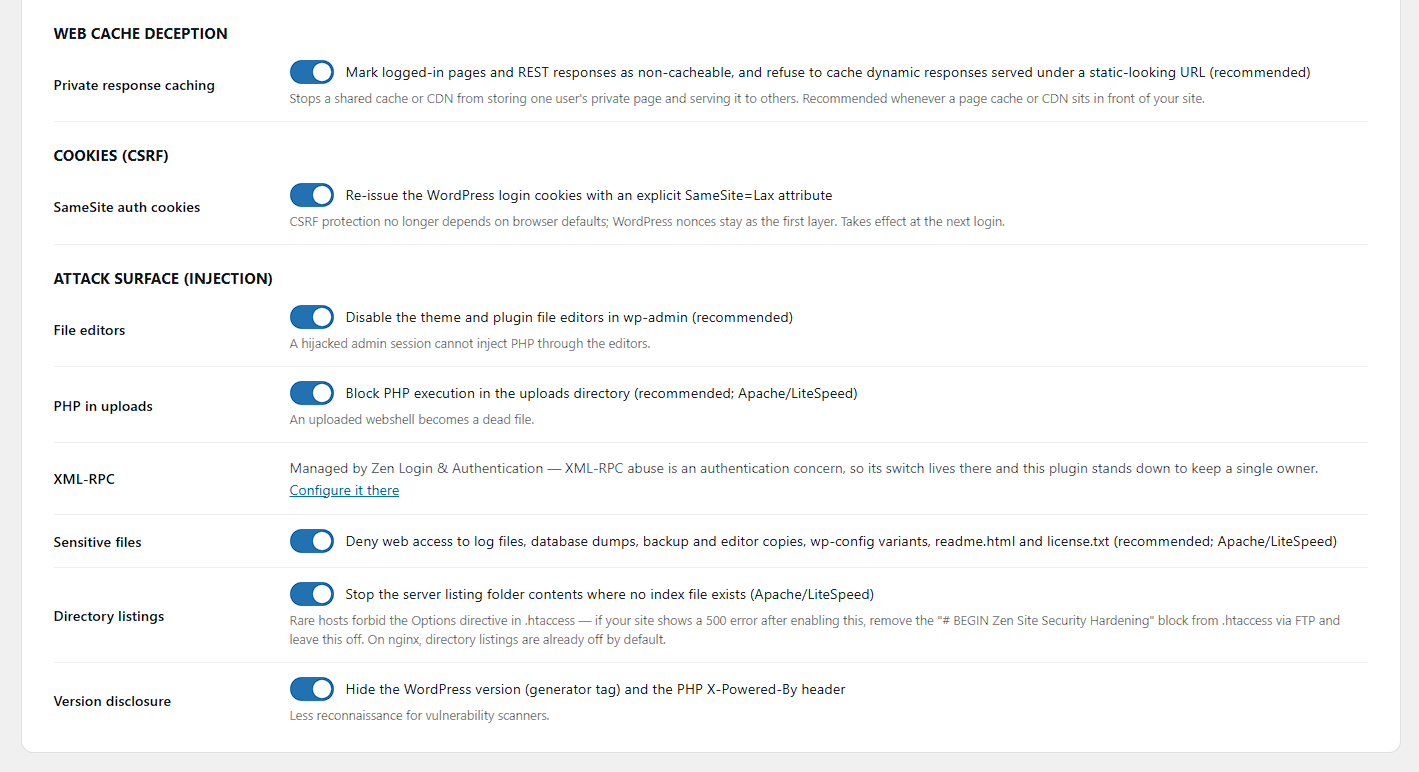
X-Content-Type-Options: nosniff,X-Frame-Options(clickjacking),Referrer-Policy(keeps tokens out of cross-site referrers), a conservativePermissions-Policy, and CSPupgrade-insecure-requests. Every header stands down automatically if another plugin already sends it. - SameSite login cookies: the WordPress auth cookies are re-issued with an explicit
SameSite=Laxattribute, so CSRF protection no longer depends on browser defaults — a second layer next to WordPress nonces. - Attack-surface reduction: disable the wp-admin file editors (
DISALLOW_FILE_EDIT), block PHP execution in the uploads directory (an uploaded webshell becomes a dead file), deny web access to sensitive files (logs, database dumps, backup copies, wp-config variants), disable directory listings, disable XML-RPC and pingbacks, and hide the WordPress version and PHPX-Powered-Byheader.
Built to pair with Zen Login & Authentication
The two Zen plugins split the work cleanly: Zen Login & Authentication owns identity security (login forms, brute-force protection, 2FA, passkeys, user enumeration, XML-RPC), while this plugin owns transport and platform security (HTTPS, headers, cookies, file-system attack surface). When both are active, each control has exactly one owner — for example, this plugin’s XML-RPC switch automatically defers to its sibling. Each plugin is fully standalone; neither requires the other.
Web cache deception protection
When a CDN or page cache sits in front of your site, an attacker can try to trick it into storing a victim’s private page under a URL they control (for example by appending a fake .css to an account page). This plugin marks logged-in pages and authenticated REST responses as Cache-Control: no-store, private, and refuses to let a dynamic response be cached under a static-looking URL — the origin-side defense recommended by OWASP and PortSwigger.
Honest scope: these features reduce attack surface and blunt common exploit paths. They are defense in depth — they cannot fix an injection, XSS or XXE vulnerability inside another plugin’s or theme’s code, and no plugin can. Server-side injection (SQL/NoSQL), XML external entity (XXE) and web LLM/prompt-injection flaws are fixed in the application code that has the bug; keep WordPress, plugins and themes updated, and use security headers here as a second layer.
Locked out? Built-in emergency recovery
If anything goes wrong, add one line to wp-config.php:
define( 'ZENSS_DISABLE_SSL', true );
On the next visit the plugin reverts your site to http, disables the redirect, and removes its .htaccess rules.
تصوير

انسٽاليشن
- Install and activate the plugin.
- Go to Settings HTTPS & SSL.
- If a valid certificate is detected, click Activate SSL & HTTPS redirect.
- Done — optionally enable HSTS later, once everything runs smoothly.
FAQ
-
Does the plugin generate SSL certificates?
-
No. Your hosting provider installs the certificate (most offer free Let’s Encrypt certificates in their control panel). This plugin detects the certificate, migrates WordPress to https, and keeps the site redirected and mixed-content free.
-
What happens when I deactivate the plugin?
-
The plugin removes its .htaccess rules, and the PHP redirect stops. Your site URLs stay on https on purpose — deactivating a plugin should never push a working https site back to http. Use “Revert site to HTTP” on the settings page first if you really want to go back.
-
I activated SSL and now I cannot reach my site. What do I do?
-
Add
define( 'ZENSS_DISABLE_SSL', true );to wp-config.php via FTP or your hosting file manager. The plugin reverts everything on the next request. Remove the line once your certificate is fixed. -
Does it work behind a proxy or load balancer?
-
Yes. The .htaccess rules skip requests that already arrive with
X-Forwarded-Proto: https, preventing redirect loops. If your proxy terminates SSL and WordPress does not detect it, your proxy setup needs the standardHTTP_X_FORWARDED_PROTOhandling in wp-config.php. -
Can this plugin stop SQL injection or XSS vulnerabilities in my other plugins?
-
No plugin can patch vulnerable code in another plugin — be wary of any that claims to. What this plugin does is defense in depth: security headers that make XSS harder to exploit, SameSite cookies that blunt CSRF, and attack-surface reduction (no file editors, no PHP execution in uploads, no XML-RPC) that turns many injection exploit paths into dead ends. Keeping WordPress, plugins and themes updated remains essential.
-
Is multisite supported?
-
Version 1.x targets single-site installs. Multisite support is planned.
-
Does this plugin work together with Zen Login & Authentication?
-
Yes — they are designed as a pair that fills each other’s gaps. Zen Login & Authentication covers identity and login security; this plugin covers transport and platform security. When both are active, overlapping controls (like XML-RPC) are owned by exactly one of them, and site-wide security headers automatically stand down on pages where the sibling already sends them. Each plugin also works fine on its own.
جائزا
ھن پلگ ان لاءِ ڪي به رايا ناھن.
تعاون ڪندڙ & ڊولپرز
“Zen Site Security” اوپن سورس سافٽ ويئر آهي. ھيٺين ماڻھن ھن پلگ ان ۾ حصو ورتو آھي.
تعاون ڪندڙ
ترجمو ڪريو “Zen Site Security” توهان جي ٻولي ۾.
ڊولپمينٽ ۾ دلچسپي؟
ڪوڊ براؤز ڪريو، چيڪ ڪريو SVN مخزن، يا رڪنيت حاصل ڪريو ڊولپمينٽ لاگ پاران RSS.
لاگ تبدیل ڪريو
1.13.1
- Fix: enabling Strict CSP in Report-Only mode no longer removes the enforcing Content-Security-Policy from your front end, and no longer drops CSP from wp-admin. The enforcing baseline policy now stays in place until Strict CSP is actually switched to Enforce, alongside the Report-Only strict policy.
1.13.0
- Renamed from “Zen HTTPS & SSL” to “Zen Site Security” (new slug: zen-site-security). The plugin now covers far more than SSL — security headers, hardening, Content-Security-Policy, certificate monitoring and security.txt — so the broader name reflects what it actually does.
1.12.1
- Fix: the version number shown on the settings page lagged behind the actual plugin version (the internal version constant was not bumped in 1.12.0).
1.12.0
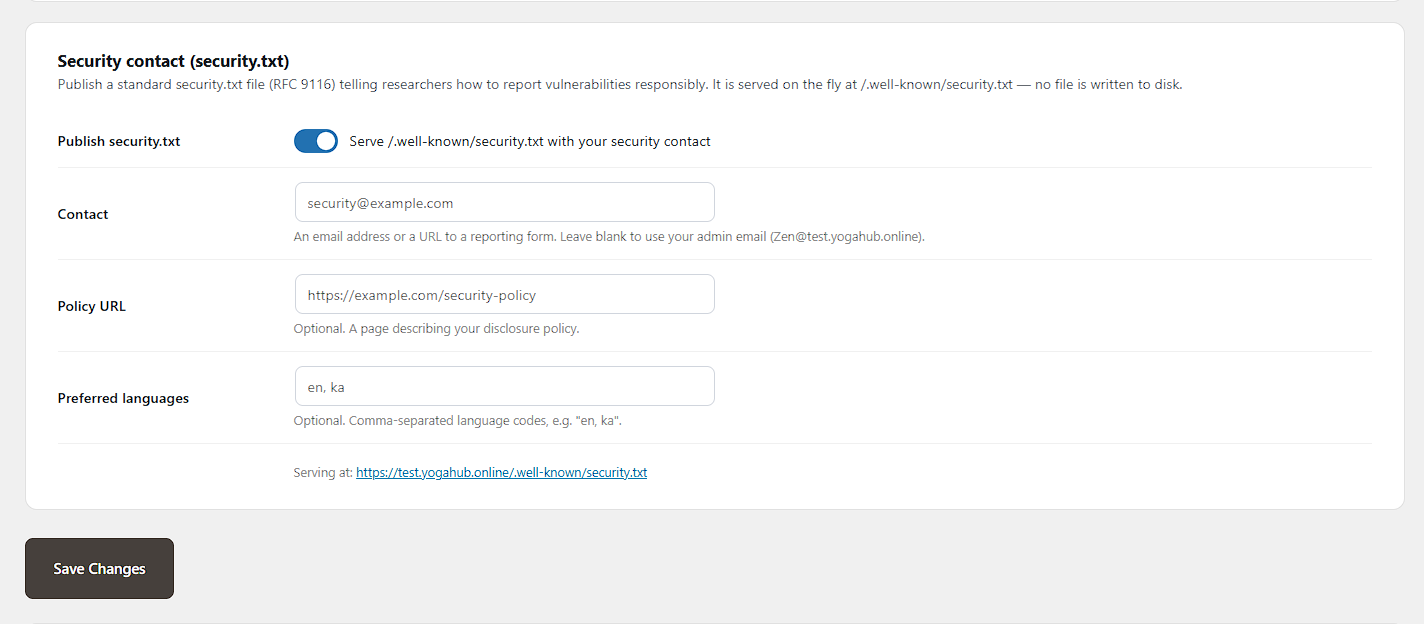
- New: optional security.txt (RFC 9116) — a responsible-disclosure file served on the fly at /.well-known/security.txt (and /security.txt), with configurable Contact, Policy URL and Preferred-Languages. No file is written to disk, so it never clashes with Let’s Encrypt / ACME challenges.
1.11.0
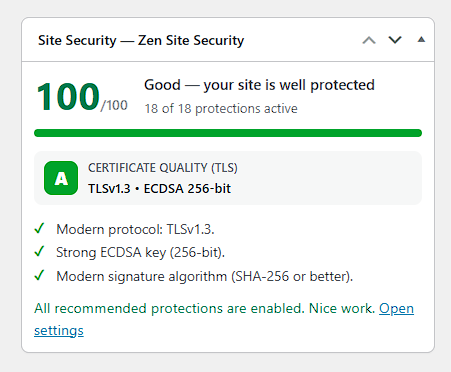
- Improved: the Dashboard security widget now lists the certificate quality findings (protocol, key, signature) beneath the TLS grade, matching the settings page.
1.10.0
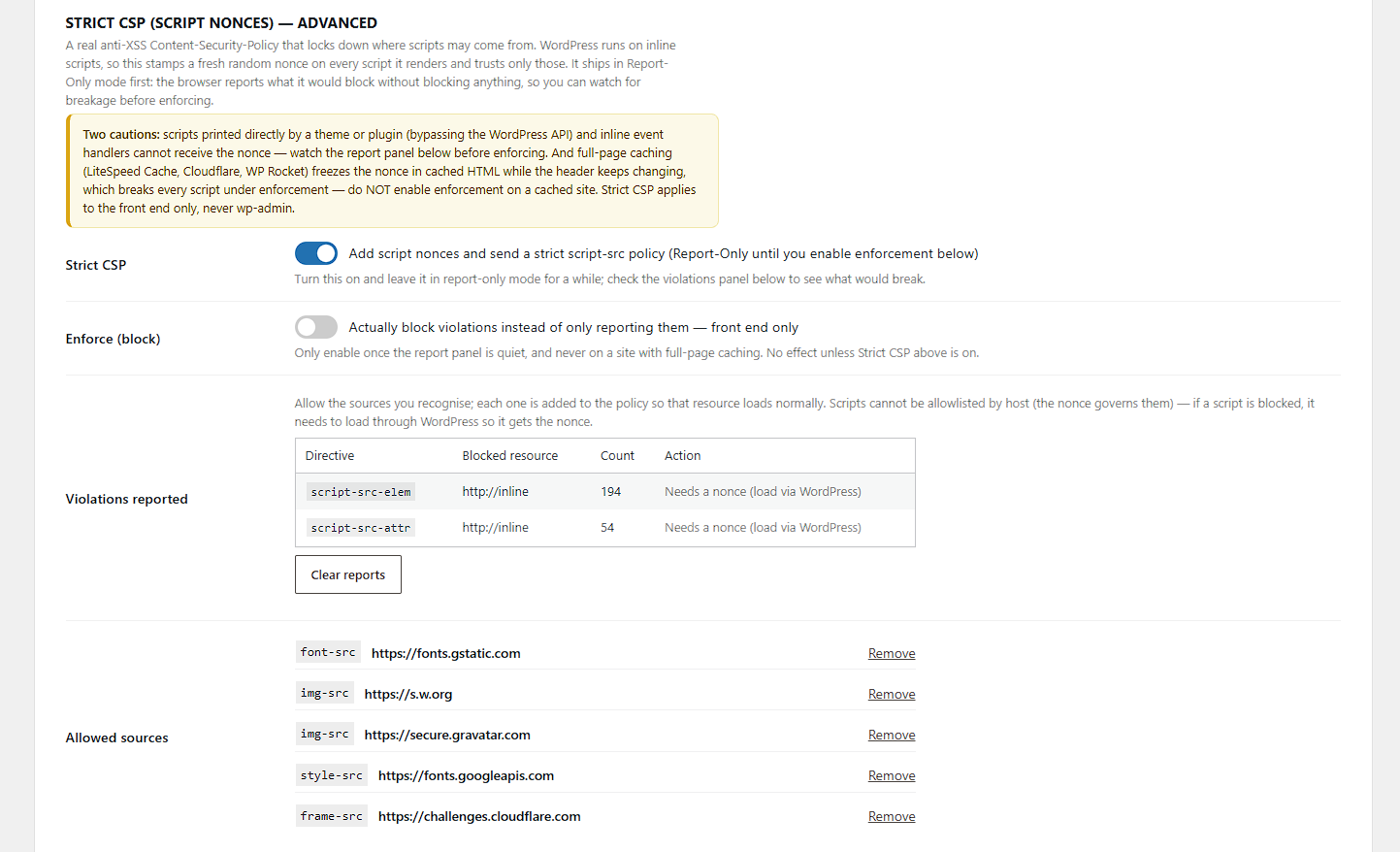
- New: CSP report allowlist workflow. The strict CSP now also governs styles, images, fonts, connections, frames and media, so the violations panel shows exactly what would be blocked — and each recognised source gets a one-click “Allow” button that adds it to the policy. A “ready to enforce?” nudge appears once report-only has been quiet for two weeks. Scripts remain governed by the nonce (they can’t be host-allowlisted, and the panel says so).
- New: the Dashboard security widget now shows the certificate quality (TLS) grade too, alongside the security score.
1.9.0
- New: Certificate quality (TLS) grading — a letter grade with specific findings for the negotiated protocol, key strength, signature algorithm, cipher and certificate chain, shown on the settings page. Honest about scope (it inspects your certificate and the negotiated connection) and links to the SSL Labs deep test for a full protocol/cipher audit.
1.8.0
- New: Dashboard security-score widget — an at-a-glance score (0–100), how many protections are active, your top recommended next steps, and a one-click “Enable recommended protections” button that turns on the safe defaults for you.
- New: Site Health integration — the plugin’s protections now appear as tests under Tools Site Health (HTTPS/SSL, security headers, hardening), plus a full posture breakdown in the Info tab.
- Both surfaces are driven by one shared posture engine, so the score, the recommendations, and the Site Health tests always agree.
1.7.0
- New: certificate expiry email alerts — a daily background check (WP-Cron) re-probes your SSL certificate independently of admin visits and emails the site administrator once when fewer than 15 days remain, and once more if it expires. Opt-out toggle under Notifications; requires SSL to be active.
1.6.0
- New: Strict CSP (script nonces) — an advanced, opt-in Content-Security-Policy that stamps a per-request nonce on WordPress-rendered scripts and ships
script-src 'nonce-…' 'strict-dynamic'. Report-Only by default with a violations panel; a separate front-end-only “Enforce” toggle. - Fix: the .htaccess CSP no longer emits upgrade-insecure-requests when SSL is not active — it now tracks the real SSL state instead of assuming https.
1.5.0
- New: “Server-level headers” option — write the security headers into .htaccess (mod_headers) so static files (CSS, JS, images, fonts) and non-WordPress responses are covered, not just pages WordPress renders. Uses
Header always set, so PHP-rendered pages are never double-headed; removed cleanly on deactivation. - The server-level HSTS line is guarded by an https expression and stays in sync with SSL activation/reversion.
1.4.0
- New: translation template (languages/zen-site-security.pot) — the plugin is fully translation-ready.
- Improved: the settings page moved from Settings HTTPS & SSL to its own top-level “Zen Site Security” menu entry, next to Zen Login & Authentication.
- Improved: the settings page now uses the Zen family admin theme — card layout, toggle switches, and clearer grouping.
1.3.0
- New: Web cache deception protection — Cache-Control: no-store, private on authenticated pages and REST responses, and on dynamic responses served under static-looking URLs; signals common page-cache plugins to bypass logged-in responses.
- New: opt-in CSP anti-XSS directives — object-src ‘none’, base-uri ‘self’, and frame-ancestors mirroring your clickjacking setting, assembled into a single Content-Security-Policy header.
- Docs: honest scope statement on injection/XXE/LLM classes — defense in depth, not a patch for vulnerable third-party code.
1.2.0
- New: sibling awareness — when Zen Login & Authentication is active, the XML-RPC switch defers to it (single owner per control) and the settings page shows the division of responsibilities.
- New: deny web access to sensitive files — logs, SQL dumps, backup/editor copies, wp-config variants, readme.html, license.txt (managed .htaccess block).
- New: disable directory listings (Options -Indexes, with a documented recovery path).
- Improved: the version-disclosure toggle now also removes PHP’s X-Powered-By header.
- Fix: managed .htaccess block markers are line-anchored so the redirect and hardening blocks can never swallow each other.
1.1.0
- New: Security hardening module (all opt-in).
- New: Security headers — X-Content-Type-Options, X-Frame-Options, Referrer-Policy, Permissions-Policy, CSP upgrade-insecure-requests — with automatic stand-down when another plugin already sends the header.
- New: SameSite=Lax re-issue of the WordPress auth cookies (CSRF defense in depth).
- New: Disable wp-admin file editors, block PHP execution in uploads, disable XML-RPC/pingbacks, hide the WordPress version.
- Fix: SSL activation could not persist — the registered-settings sanitizer reverted the ssl_enabled flag on every activation click. The flag now lives outside the registered settings array.
- Fix: SSL status card no longer claims “site runs on http” when the site URLs already use https.
1.0.0
- Initial release.
- One-click SSL activation with certificate verification.
- PHP 301 redirect (default) and optional .htaccess redirect with automatic cleanup.
- Front-end (and opt-in admin) mixed content fixer.
- Certificate dashboard with expiry warnings.
- Opt-in HSTS with preload safeguards.
- Emergency recovery via the ZENSS_DISABLE_SSL constant.