

وضاحت
A collection of page-building blocks for WordPress Gutenberg Block Editor to make content creation easier, more flexible, & more efficient.
Available Blocks
[Accordion]
[Buttons]
[Columns]
[Container]
[Heading]
[Icon]
[Image]
[Popup]
Slider/Carousel
[Social Links]
[Spacer]
Tabs
Documentation
Check out our documentation for more information on the individual blocks and how to use them.
تصوير
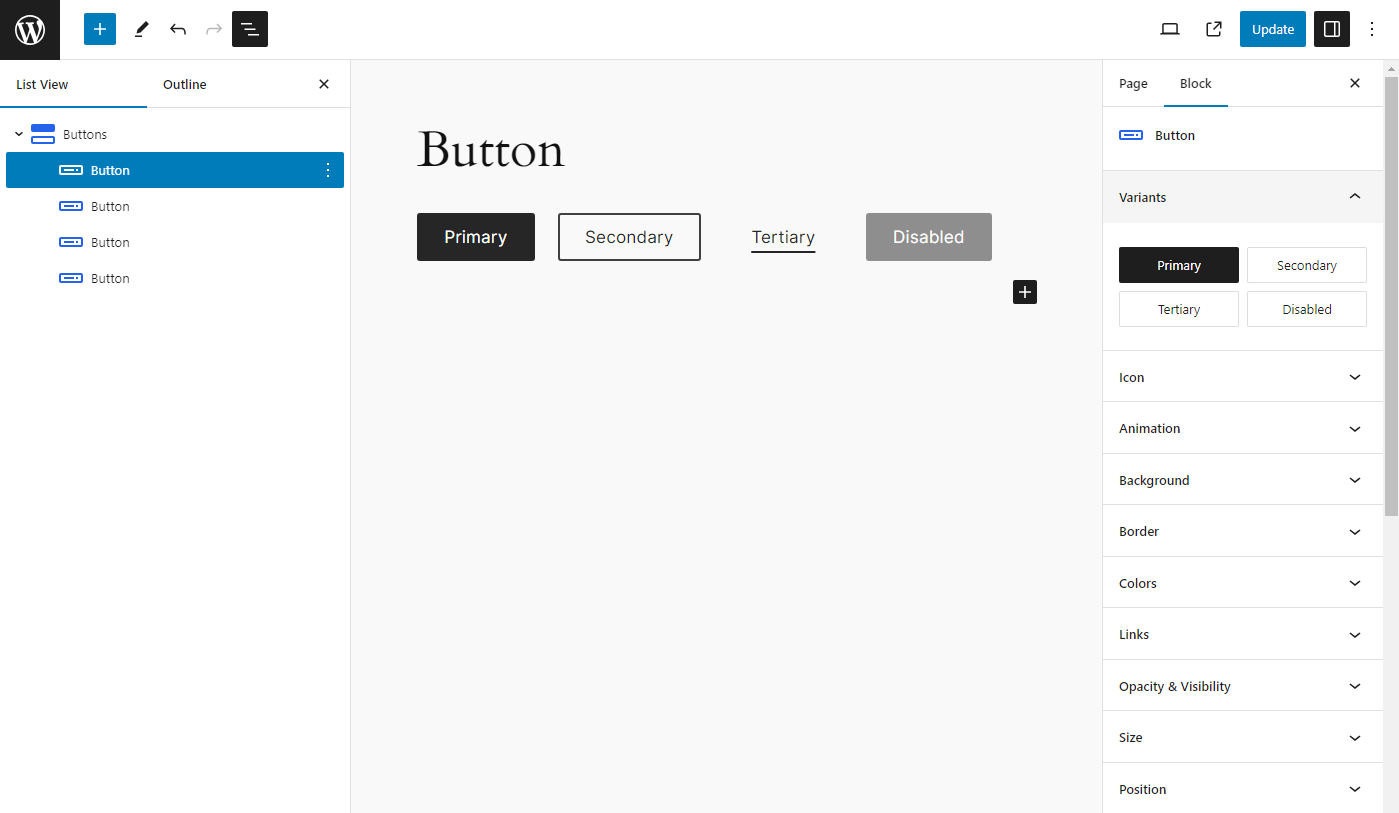
بلاڪس
جمع: هي پلگ ان 31 بلاڪس مهيا ڪري ٿو.
- Tab Content
- Accordion
- Container
- CountUp
- Heading
- Popup
- Slider
- Tabs
- CountUps
- Icon
- Accordion Opened Title
- Accordion Items
- Accordion Title
- Buttons
- Slide
- Columns
- Button
- Social Links
- Styles
- Image
- Social Link
- Tab Panel
- Testimonials
- Tab List
- Spacer
- Team
- Active Tab
- Accordion Item
- Column
- Hero
- Tab
انسٽاليشن
- Go to “Plugins > Add New” in your Dashboard and search for: enBlocks, Install and activate enBlocks plugin.
- Download the .zip from WordPress.org, and upload the folder to the
/wp-content/plugins/directory via FTP.
In most cases, #1 will work fine and is way easier.
FAQ
-
How do I add blocks to my page?
-
- Create a new page or post
- Add a new block, and look for the “enBlocks” category
- Select a block & start building.
-
What theme should I use?
-
It will work with most of the block themes.
جائزا
ھن پلگ ان لاءِ ڪي به رايا ناھن.
تعاون ڪندڙ & ڊولپرز

ترجمو ڪريو “enBlocks” توهان جي ٻولي ۾.
ڊولپمينٽ ۾ دلچسپي؟
ڪوڊ براؤز ڪريو، چيڪ ڪريو SVN مخزن، يا رڪنيت حاصل ڪريو ڊولپمينٽ لاگ پاران RSS.
لاگ تبدیل ڪريو
1.4.4
- Fix: Container block dynamic visibility
- Fix: Spacing/gap linked–unlinked UI values
- Fix: Sanitize inline block CSS before output
- Fix: Pattern PHP files (direct-access guards, prefixed asset URL vars)
- Fix: Accordion default pattern registration
- Fix: Use local pattern asset URLs in CSS (no remote enblocks.com requests)
- Fix: Force noopener/noreferrer on links that open in a new tab
- Security: Restrict heading custom-field meta to non-protected keys
- Security: Harden block pattern registration against path traversal
- Security: Allow only http(s)/data/relative CSS url() schemes
- Security: Validate container HTML tag names on render
- Security: Sanitize accordion icon SVG before CSS mask encoding
- Improvement: Sticky device preview toggle in editor controls
- Improvement: Tabs keyboard navigation (modern key events, Home/End)
- Improvement: PHPCS tooling (plugin prefixes, PHP 7.4 compatibility checks)
- Update: WordPress coding standards hardening for core PHP includes
- Update: Ship src/ and LICENSE in the plugin distribution for WordPress.org compliance
- Update: Tested up to WordPress 7.1
- Removed: Unused code, options-page stub, and dead npm dependencies
1.4.3
- Fix: Minor issues and optimized style loading
- Update: Container block visibility condition with dynamic data
- Update: Heading block with dynamic data
- Update: Uses CSS logical properties
- Update: Fluid border radius
- Update: Optimized code for better performance
1.4.2
- Add: Accordion block
- Add: Testimonials block
- Fix: Tabs block issues and optimized styles
- Update: Includes pattern images within a plugin
1.4.1
- Add: Slider block
- Add: Tabs block
- Fix: Global padding issue
- Fix: Default values
- Removed: layout-flow class from column block
1.4.0
- Fix: Various styling issues
- Update: Block component UI
- Update: Combined similar block component
- Updated: Removed force margin and padding
- Updated: Improved performance
- Removed: Cleanup unwanted files
1.3.10
- Add: Team block
- Add: Social Links block
- Fix: Button icon
1.3.9
- Add: Popup block
- Add: CountUps block
- Fix: Container block padding issue
- Fix: Spacing: margin auto
- Fix: Link decoration style issue
- Update: Heading block with span tag support
1.3.8
- Add: CountUp block
- Fix: remove grid from Container block
1.3.7
- Add: Hero Block
- Add: Hero Block variations
- Fix: spacing component
1.3.6
- Update: container block with grid layout
- Optimized for performance
1.3.5
- Add: spacer block
- Update: container block with Flexbox layout
- Fix: animation issue
- Fix: buttons block issue
- Fix: size with responsive unit
1.3.4
- Fix: fluid columns – column width issue
- Fix: grid-column and grid-row min max value issue
- Add: SVG icons
1.3.3
- Add: icon block
1.3.2
- Fix: packages upgrade issues
1.3.1
- Add: inline component help text
- Add: fancy border radius for image block
- Fix: background animated background issue
- Update: refactor unit component
- Update: refactor spacing component
1.3.0
- Add: image block
1.2.0
- Add: container block and heading block
1.1.1
- Refactor: button block
- Fix: animation conflict with animated background
1.1.0
- Added more variable fonts
- Added blueprint
- Added button accessibility options
- Fixed typography issues
- Fixed block animation conflict with animated background color
- Added columns block and column block
1.0.0
- Initial release