

وضاحت
AUTOMATED PLUGIN FOR ALL OF YOUR SECURITY SCANNING NEEDS
The CloneGuard Security Scanning plugin helps increase the Trust level of your website visitors.
Easily add a certified CloneGuard Security Seal widget anywhere on your website or cart, by using your existing WP theme.
View, start, create, modify, enable/disable your PCI ASV Scans, Vulnerability Scans, GDPR Scans, or Pentests.
Start your website’s easy certification process today:
- Place your order (use our discount code below for WordPress users)
- Install the CloneGuard WP plugin
- Login with your credentials that you’ve created in step 1 above
- Schedule your scan(s) and let the automated AI platform perform them
- Place the Security Seal widget anywhere on your website
YOUR DISCOUNT
WordPress users can get a discount by using a first-time order code: WORDPRESSNEW
Support
Our clients enjoy our 24×7 support services. We’ve created a stable security solution so that you can focus on your website. Contact us for additional information and technical support.
تصوير


انسٽاليشن
- Upload clone-guard-security-scanning to the
/wp-content/pluginsdirectory. - Login to the WordPress admin panel and go to the the plugins page. On the plugins page, activate the CloneGuard Security Scanning plugin.
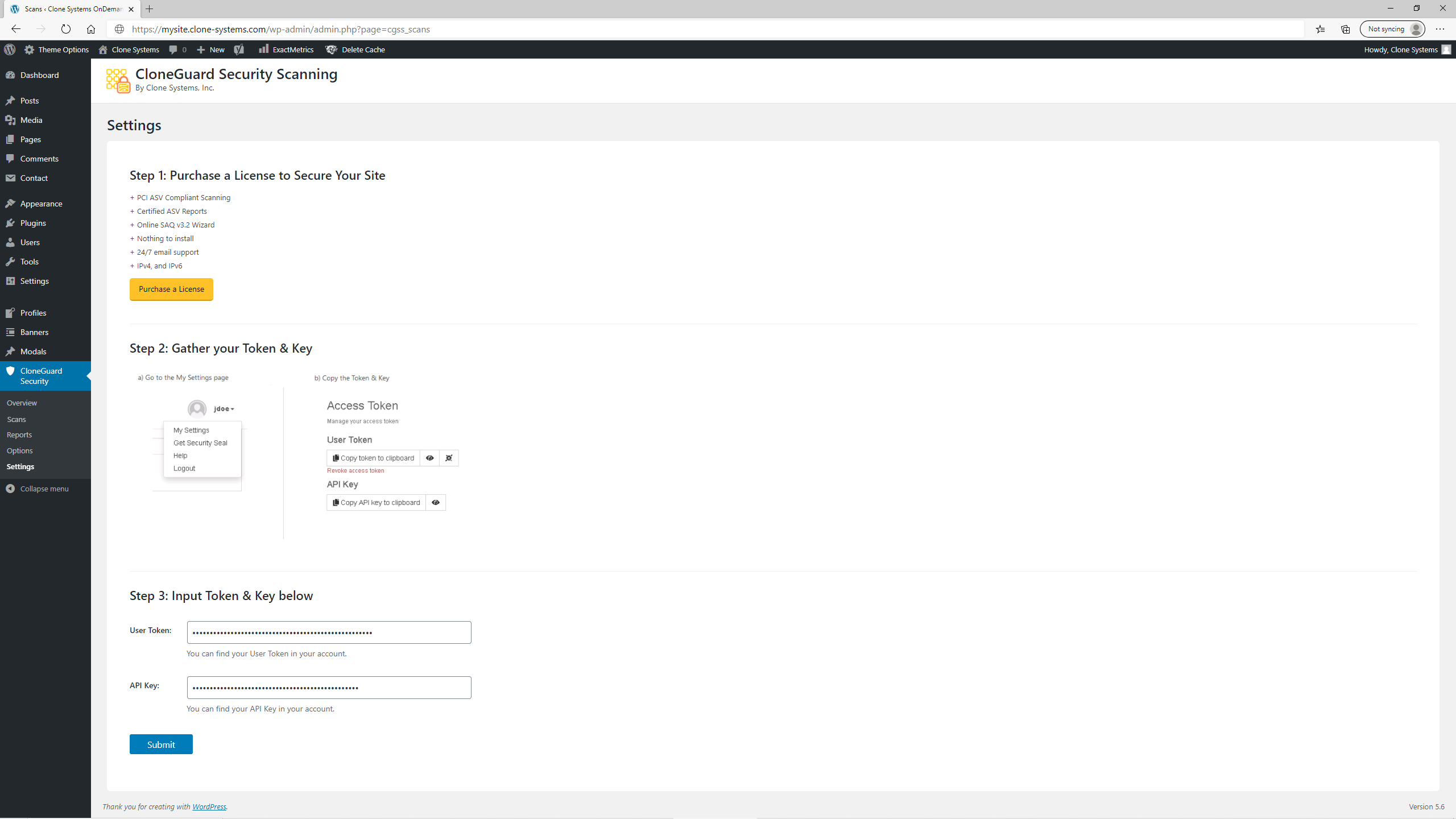
- Navigate to the CloneGuard > Settings page.
- Enter your CloneGuard User Token and API Key (if you do not have these, you will need to access them on the Clone Systems website).
- The CloneGuard Security Scanning plugin is now fully active.
- Navigate to the CloneGuard > Scans page to view your scans.
جائزا


تعاون ڪندڙ & ڊولپرز
“CloneGuard Security Scanning” اوپن سورس سافٽ ويئر آهي. ھيٺين ماڻھن ھن پلگ ان ۾ حصو ورتو آھي.
تعاون ڪندڙ
ترجمو ڪريو “CloneGuard Security Scanning” توهان جي ٻولي ۾.
ڊولپمينٽ ۾ دلچسپي؟
ڪوڊ براؤز ڪريو، چيڪ ڪريو SVN مخزن، يا رڪنيت حاصل ڪريو ڊولپمينٽ لاگ پاران RSS.
لاگ تبدیل ڪريو
2.5
- Uploaded new Validation Report screenshot
- Tested plugin up to 6.5.2 WordPress version
2.4
- Made minor Overview page styling enhancements.
- Added new product screenshots to the Overview page.
2.3.3
- Changed the Banner with a new one.
2.3.2
- Changed Plugin description texts
- Fixed icons position text in Scans Page
- Added Banner on the WordPress Plugin Directory.
2.3.1
- Added multi-select capability to the exception submission process
2.3
- Added capability to submit vulnerability exceptions
2.2.2
- Visualization updates on vulnerabilities and overview pages
2.2.1
- My Settings fixes
- Updated images
2.2.0
- Added vulnerabilities page
- Added vulnerability details page
- Responsive functionality fixes
2.1.0
- Added overview page
- Implemented scan profiles for vulnerability management
- Implemented scan profiles for pentesting
- Added portal URL customization for partner portals
2.0.0
- Added vulnerability scanning module
- Added penetration testing module
- Implemented tabs functionality
- Implement bulk actions functionality on Options page
1.8.0
- Added Options page
- User can now manage schedules, targets, and notifications
1.5.2
- Added image folder
1.5.1
- Added screenshots
- Fixed New Notification button alignment
1.5.0
- Design Improvements
1.0.0
- Initial release