

وضاحت
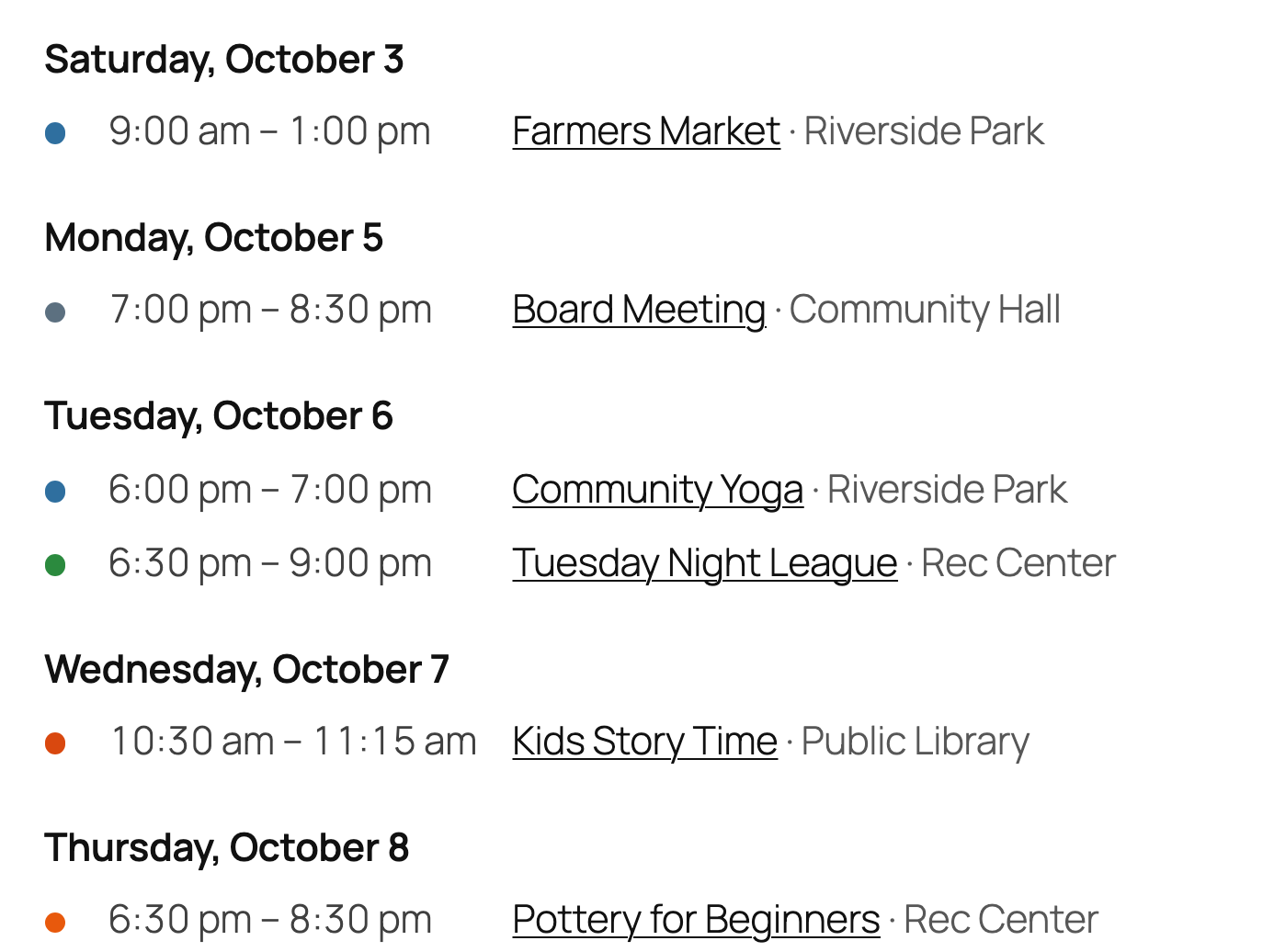
Beacon Events is an events calendar for single events and repeating ones alike: a one-night workshop, a show’s run, a weekly class. It does the basics properly and doesn’t charge you for them. See it running on a stock Twenty Twenty-Five site: month grid with the filter bar, day view, event pages, venue pages.
Who it’s for. Churches publishing weekly services and a monthly potluck. Yoga, pilates, fitness, dance and martial-arts studios, gyms and music schools with a weekly class schedule, shown as a timetable, and class sign-ups with Pro. Libraries and schools with story times, term dates and board meetings. Senior living communities and community centers with a monthly activity calendar that also goes up on the noticeboard. Cooking schools, paint and sip studios, pottery, glass and craft studios, art classes, makerspaces and nature centers selling workshop tickets. Wineries, breweries and farms with tastings, trivia nights, markets and seasonal events, and small museums with member and non-member tickets. Clubs, meetups and volunteer groups, bars and venues with a weekly music night, and anyone running online events on Zoom or Google Meet.
Recurring rules use the iCalendar RRULE standard, the same format Google Calendar and Outlook use, so a rule like “second Tuesday of the month” round-trips with calendar apps.
- Recurring events are free. Daily, weekly, monthly (“second Tuesday”, “last Friday”, “the first and third Thursday”), yearly — with an end date or a count, dates you can skip, single dates you can cancel or move, and a ticket link per date when each date has its own registration page.
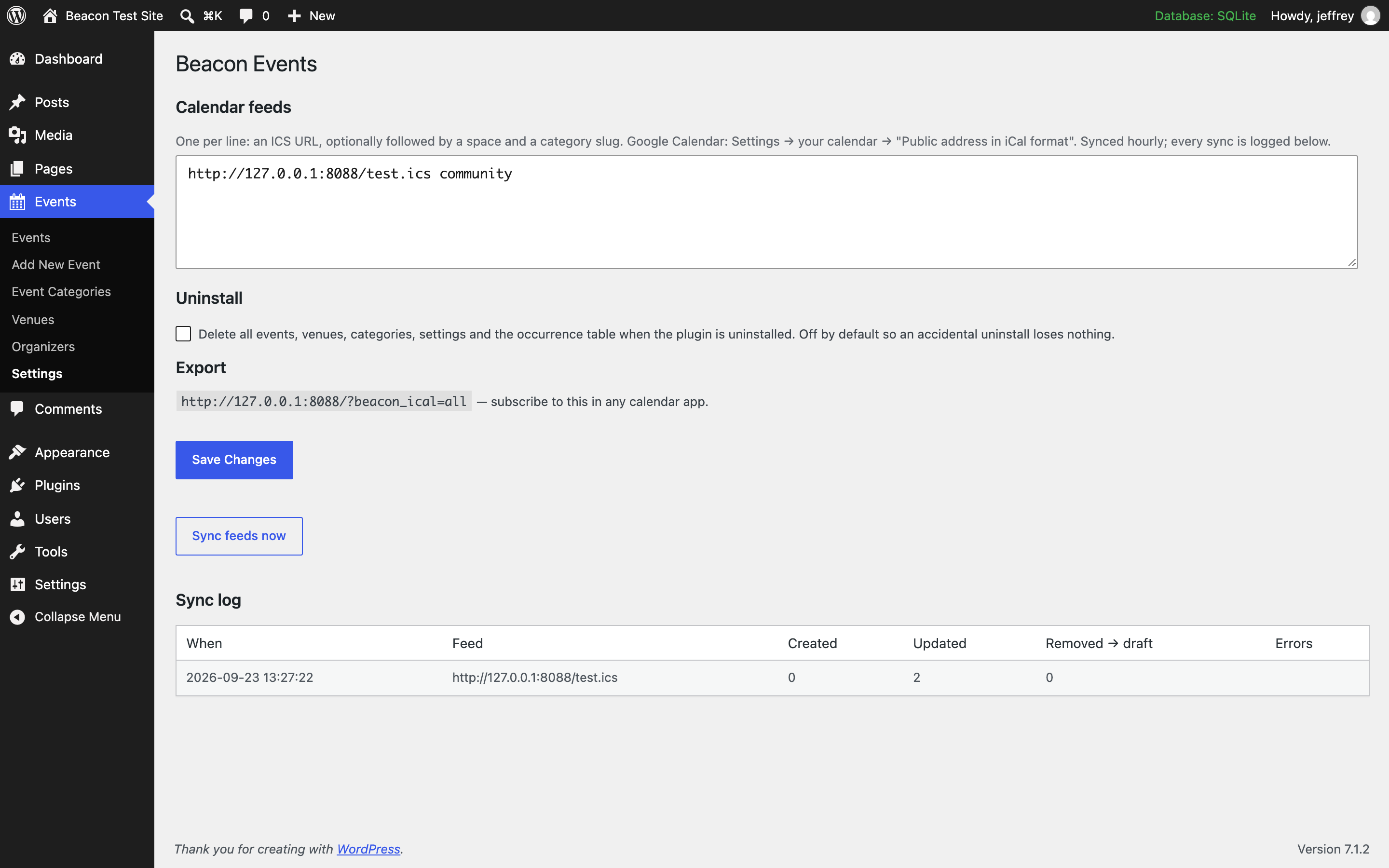
- Import from Google Calendar or any ICS feed, and stay in sync. Feeds are checked hourly. Every sync is logged — created, updated, removed — so nothing drifts silently. Events that disappear from a feed are set to draft, never deleted behind your back.
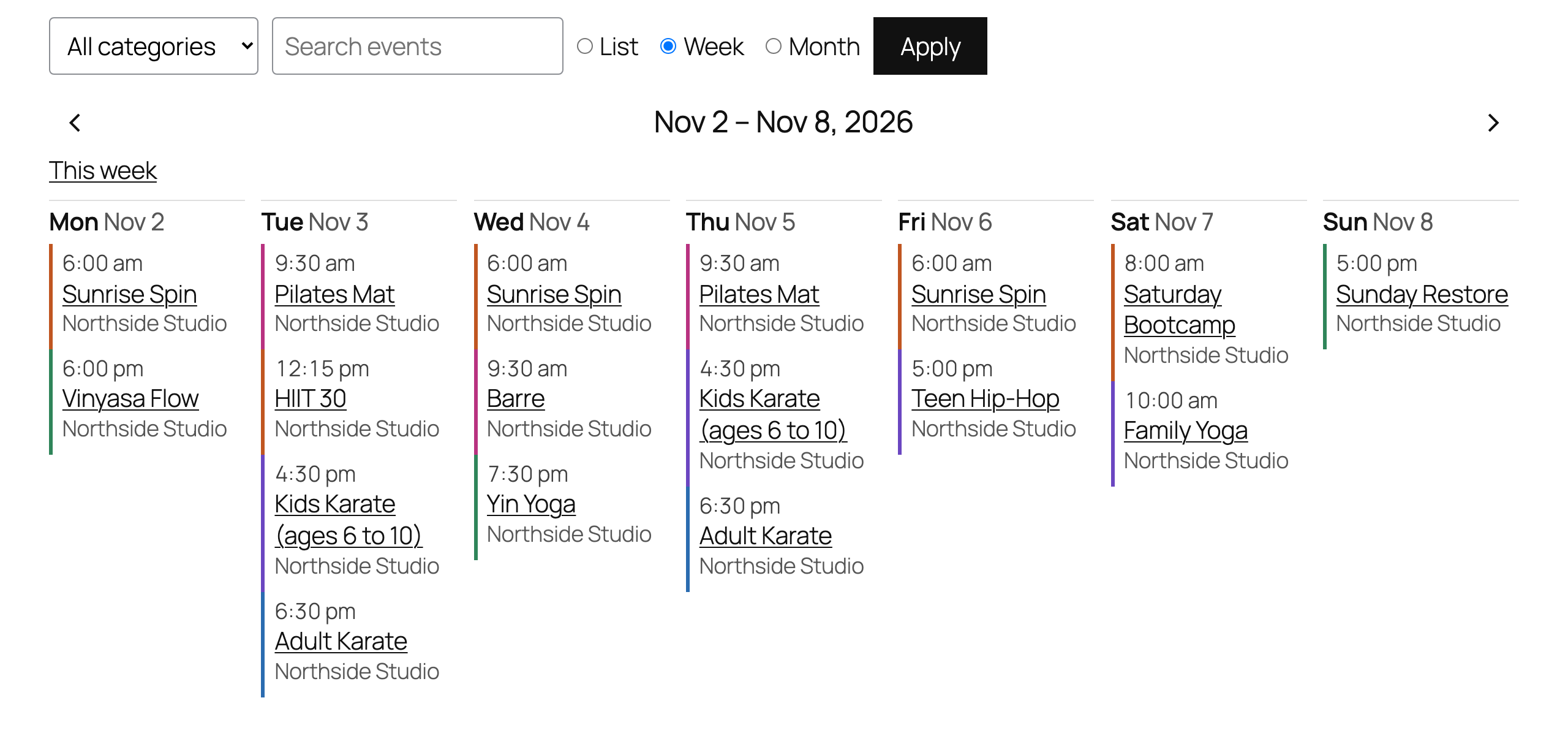
- Views that look like your site. List, week, month and day views as blocks, shortcodes or an Elementor widget, with an optional filter bar (category, venue, search). The week view is a class timetable: a column per day, stacked into rows on phones and narrow columns. Our stylesheet does layout only — colours and fonts come from your theme, and every element has a class you can target. Give a category a colour and its events get a dot or a bar.
- A month you can print. Under every month view, “Print this month” opens the month on a page of its own, laid out for one landscape sheet: times first, full titles, your category colours with a key, and the calendar’s address at the foot. Handy for a noticeboard or the front desk.
- No bloat. Styles load only on pages that show events. No add-on store, no upsell screens, no nag notices.
- Accessible. The month view is a real table with column headers, each day link carries its full date for screen readers, and on Twenty Twenty-Five every view passes axe-core’s automated WCAG 2.1 AA checks, colour contrast included.
- Sell tickets where you like. Each event can link to its Eventbrite, Square or other ticket page with its own button text (“Buy on Eventbrite”, “Book now”). Or sell on the event page itself with the optional add-on, with no per-ticket fee.
- Up and running in a minute. Click “Get started”: add a few sample events to see the calendar working (one click removes them), and let it make a Calendar page for you.
- Every event in its own timezone. A class in Boston shows 10 am Boston time even if your site is set to Chicago, with the zone’s abbreviation when they differ.
- Online events. Flip “Online event”, paste the meeting link, and visitors get a Join button; calendar apps get the link too.
- Search engines understand your events. schema.org Event markup on every event page, one entry per upcoming date.
- Venues with addresses. Each venue has a street address, shown on the event with a map link — no API key, no embedded map slowing the page down.
- Export. Every event has “Add to calendar (.ics)” and “Add to Google Calendar” links, and your whole calendar has a subscribable feed.
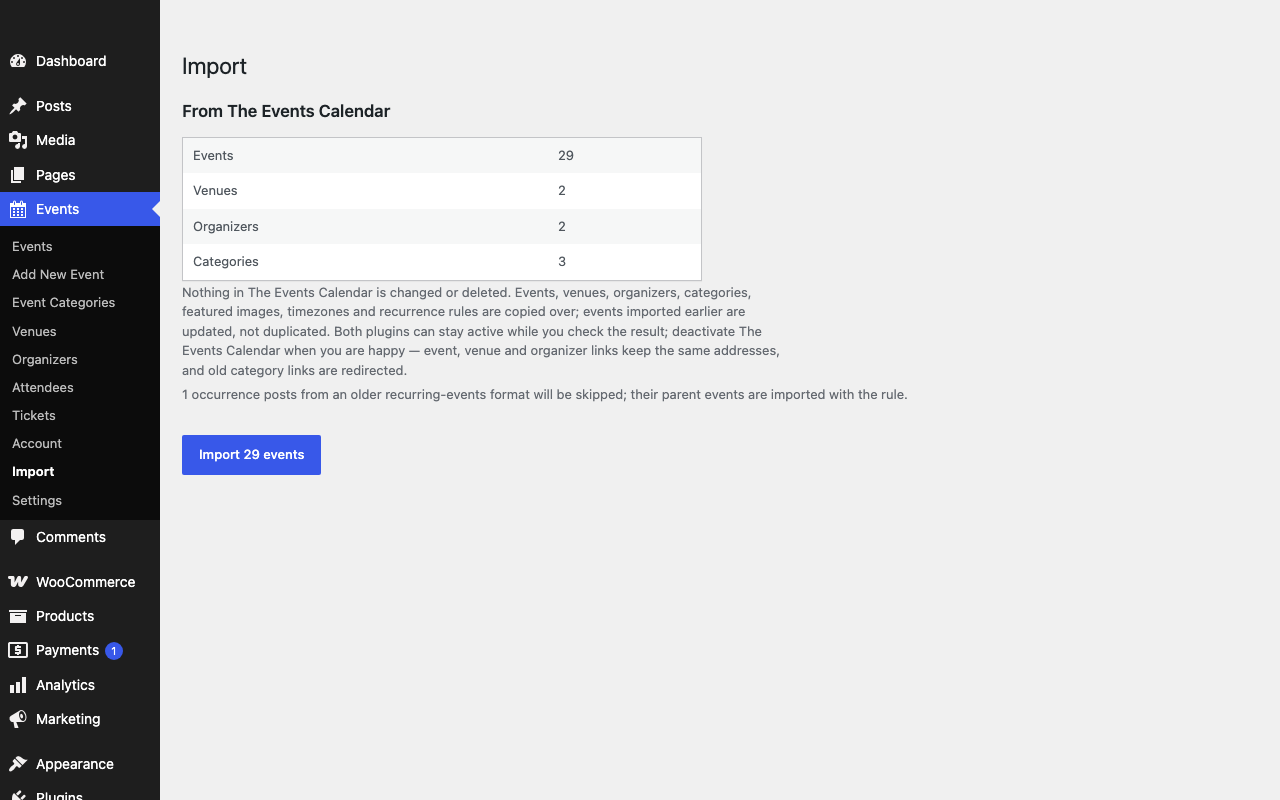
- Moving from The Events Calendar, Events Manager, Sugar Calendar, Eventin, Modern Events Calendar, EventON, WP Event Manager, WP Events Manager (ThimPress) or All-in-One Event Calendar? Events Import / Export copies events, venues, organizers, categories, images and recurring rules in one click, without touching the old plugin. A dry run shows first what would be created, updated or skipped, and both the dry run and the import can be downloaded as a report with one row per event. Deactivate the old plugin when you are happy; old links are redirected. Weekly classes that were entered one date at a time (the only way in plugins that charge for repeating events) can be combined into one repeating event in a click. Anything else comes in through a CSV file, and every event can go out as one.
- Uninstalls clean. Turn on “delete all data on uninstall” and the plugin removes everything it created — events, venues, categories, settings, its table.
External services
Beacon Events does not phone home, track anything, or load scripts from third parties. Two things touch the outside world, both under your control:
- Calendar feeds you add. If you enter an ICS URL under Events Settings (for example your Google Calendar’s public iCal address), the plugin fetches that URL from your server once an hour to keep events in sync. Nothing is fetched unless you add a feed.
- Plain links. The “Map” and “Add to Google Calendar” links on an event are ordinary hyperlinks to google.com/maps and calendar.google.com. They open in the visitor’s browser; the plugin sends nothing itself. Google’s terms: https://policies.google.com/terms
Data the plugin stores
One database table, {prefix}beacon_occurrences, holding the expanded dates of each event. It is removed on uninstall only if you turn on “delete all data on uninstall” under Events Settings.
Shortcode
[beacon_events view="list" days="60" limit="20" category="workshops"] — `category` takes one slug or several, comma-separated (`category="workshops,talks"` shows events in either).
[beacon_events view="month"]
[beacon_events view="list" filters="1"] — adds the category / venue / search bar and a list / week / month switch.
[beacon_events layout="compact" limit="5"] — one line per event, for sidebars.
[beacon_events view="week"] — this week as a timetable, with previous/next links. It starts on the day set in Settings → General ("Week Starts On").
[beacon_events view="day"] — today, with previous/next links.
venue="slug" and `organizer="slug"` work like `category`.
print="no" — hides the "Print this month" link under a month view.
Block
Add the Events block and choose list, month or day in the sidebar, or the Upcoming events variation for a short one-line list. Elementor users: the Beacon Events widget has the same options.
Tickets and RSVP
Free covers the calendar. If you need people to sign up or pay — RSVP with capacity per date, paid tickets through Stripe or your WooCommerce checkout, a waitlist when a date is full, reminder emails the day before, attendee lists with CSV export, QR tickets with phone check-in at the door, visitor-submitted events — there is a paid add-on, Beacon Events Pro, with a 14-day free trial that needs no card. Nothing in the free plugin is time-limited, crippled or nagged.
Setup in five minutes
Click Get started under the plugin’s name on the Plugins screen. The Events screen walks you through the three steps below, can add five sample events so you see a full calendar straight away (removed again in one click), and makes a “Calendar” page for you with a month view, filters and the next five events.
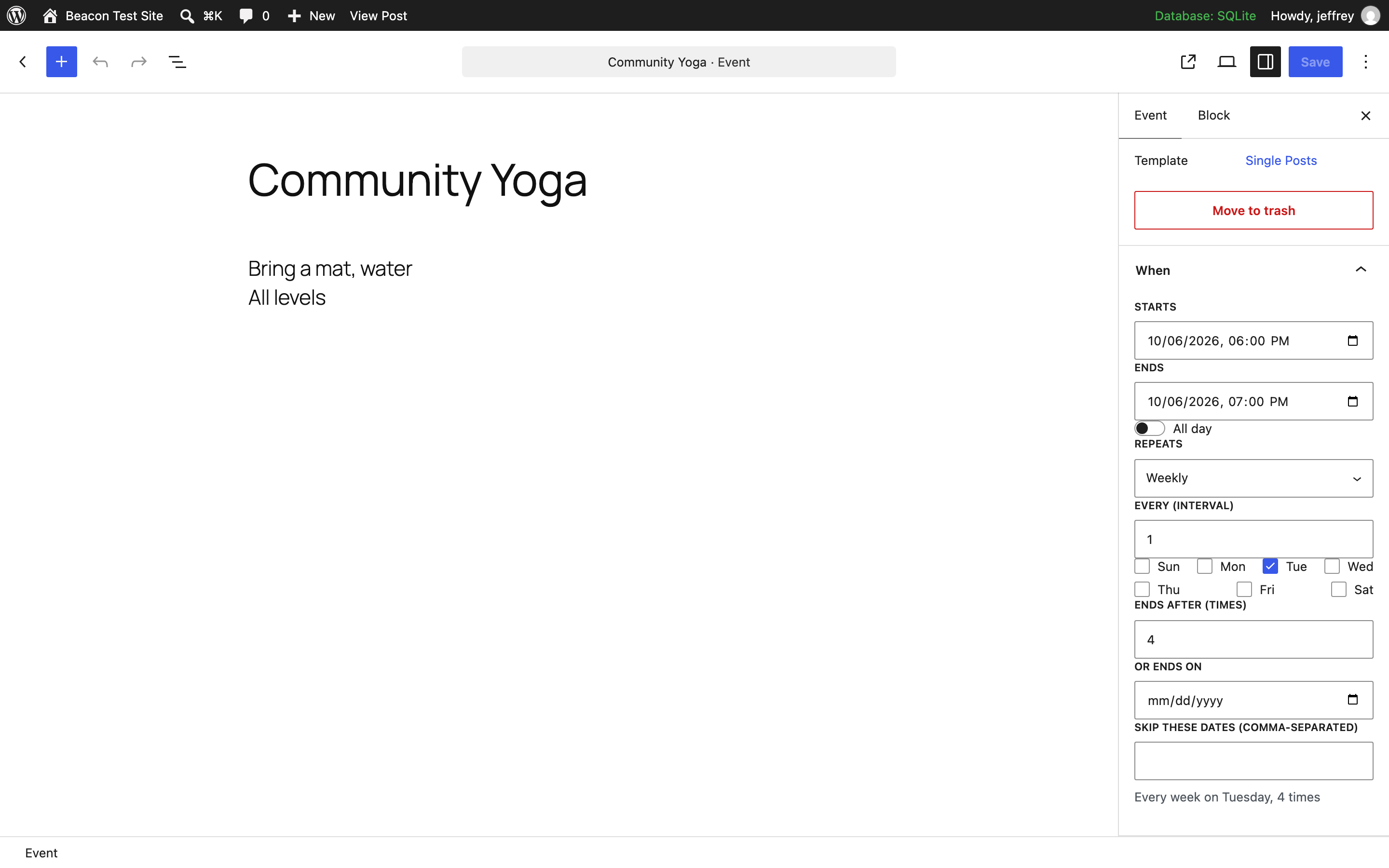
- Events Add New Event. Set Starts and Ends in the When panel; pick Repeats if it recurs (weekly on Tuesday, second Tuesday of the month, last Friday…). Add a venue and a category from the sidebar.
- Put the Events block on a page (or the shortcode below). Choose list, week, month or day, and switch on the filter bar if you have several categories or venues.
- Moving from another plugin? Events Import / Export. Have a Google Calendar? Events Settings paste its iCal address.
That is the whole setup. Everything else — colours, venues with maps, online events, per-date changes — is optional.
Roadmap
Next, in this order: a CSV import for attendees, per-event reminder settings, and translations. Requests and bug reports on the support forum get answered; the plugin is small enough that most fixes ship within days.
تصوير

بلاڪس
جمع: هي پلگ ان 2 بلاڪس مهيا ڪري ٿو.
- Events
- Venue / category details
FAQ
Are recurring events really free?
Yes. That’s the point.
How is Beacon Events different from The Events Calendar?
Recurring events and a week view: free here. In The Events Calendar the free version has month, list and day views, and recurring events and the other views come with a paid plan; the cheapest, Essentials, was $259 a year when we checked in September 2026. Tickets: Beacon Events Pro is $7 a month or $49 a year and sells through your own Stripe account or WooCommerce, with no per-ticket fee from us. Moving: the importer brings your events, venues, organizers, categories and repeat rules across in one click (and with Pro, tickets and attendees), and redirects the old links.
What The Events Calendar does that Beacon doesn’t, so you can decide honestly: seven calendar views including photo and map (Beacon has list, week, month and day), Square and PayPal payments without WooCommerce, built-in coupons and fees, and add-ons such as its Event Aggregator for pulling in Meetup and Eventbrite events. If you rely on those, stay where you are.
Can I run online or hybrid events on Zoom or Google Meet?
Yes. Turn on Online event and paste the meeting link. The event page shows a “Join online” link, the calendar file carries it, and search engines are told the event is online, or online and in person when it also has a venue, with the link as its virtual location. If you’d rather not put the link on a public page, Beacon Events Pro can send it only to the people who sign up, in their confirmation and reminder emails; the event page then says the link is sent on sign-up.
Can people print the calendar?
Yes. Every month view has a “Print this month” link under the grid. It opens that month on its own page, without your theme’s header and menus, sized for one landscape sheet (a very busy month carries on to a second page), with times first, full titles, your category colours and a key to them. It prints what the view shows, so a calendar filtered to one category prints just that category. To hide the link, switch off “Print this month” link in the block’s settings, add
print="no"to the shortcode, or use thebeacon_print_linkfilter to turn it off everywhere.Can I show a weekly class schedule (timetable)?
Yes. Put the Events block on a page and choose Week, or use
[beacon_events view="week"]. Each day of the week gets a column with its classes in time order, all-day events first; on a phone, or in a narrow column, the days stack into rows and empty days are hidden. Enter each class once as a repeating event (“every Monday and Thursday at 6 pm”), cancel a holiday or move one class without touching the rest, and addfilters="1"so visitors can pick a category (yoga, spin, kids) or a studio. Each class can carry a “Book” button to the booking system you already use.Can people sign up for gym, yoga or fitness classes?
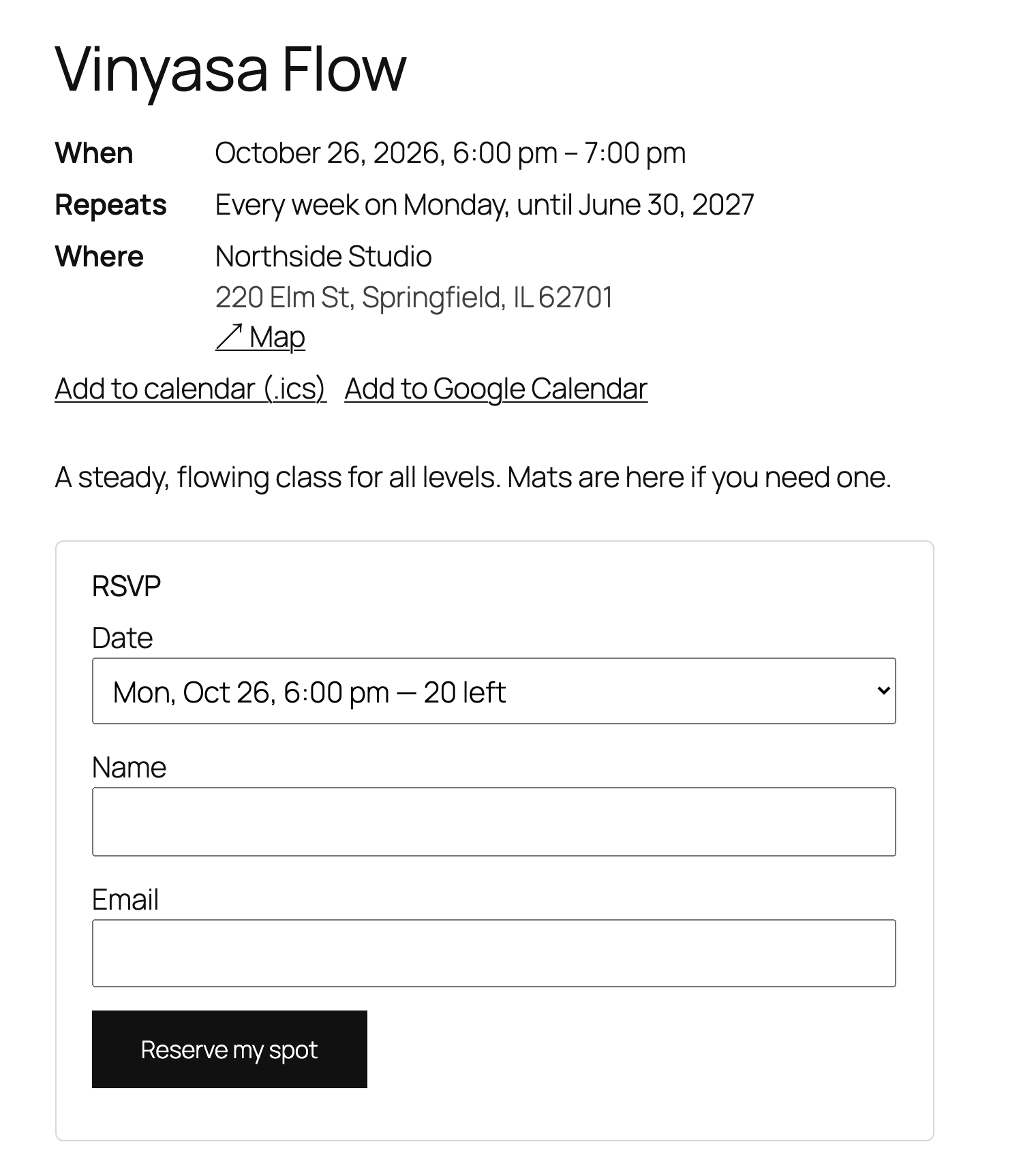
Yes, with Beacon Events Pro ($7 a month or $49 a year). Turn on sign-ups for a class and set the places per class date, for example 25 for a spin class: each date fills up on its own, the form shows how many places are left, and a full class offers a waitlist that moves up when someone cancels. People get a confirmation email with a calendar file and a reminder before class, and can cancel themselves. Classes can be free, or paid through your own Stripe account or WooCommerce, with no fee per booking on top. You see who is coming per class, can print a door list or check people in with the QR code on their booking, and if your staff live in Outlook, Pro keeps each class in your Microsoft 365 calendar with the names of who signed up; cancel a class there and everyone booked on it is told. The class timetable itself (week view, repeating classes) is free. A sample studio timetable with sign-ups is on the demo site: https://beacon-events.duckdns.org/demo/studio/
Can it run a senior living community’s activity calendar?
Yes. Enter each repeating activity once (chair yoga every Monday and Wednesday, bingo on the first Friday, a birthday party on the last Thursday of the month), give each kind of activity a category colour, and put a month view on a page. Families see the calendar online, and the “Print this month” link gives staff a landscape page with the colours and a key for the noticeboard. One date can be cancelled or moved without touching the rest, and a community with several locations can give each one its own venue and let visitors filter by it.
Does it work as a church calendar?
Yes. Enter the weekly service once as a recurring event, add special services and holidays as single events, and cancel or move one date when plans change. The month view and the upcoming list go on any page, and members can add the whole calendar to their phone with the subscribe link.
How do I connect Google Calendar?
In Google Calendar, open the calendar’s settings, make it public (“Make available to public”), and copy either its “Public address in iCal format” or its share link. Paste it under Events Settings Calendar feeds and save: the events come in straight away, and after that it syncs every hour (“Sync feeds now” does it on demand). webcal:// links work too. If Google ever answers with a web page instead of the calendar (say the calendar was made private), the sync stops and changes nothing, and the log says why.
What happens if an event is removed from my Google Calendar?
It’s set to draft on your site and the removal is written to the sync log. You decide whether to delete it.
Will it change how my site looks?
No. The stylesheet only does layout. Colours, fonts and spacing inherit from your theme.
My old calendar had every weekly class as a separate event. Can I turn them into one repeating event?
Yes. After an import (or any time), Events Import / Export lists the events that look like one series entered date by date: same title, time, length and venue, on a regular pattern such as every Tuesday, every other Saturday, the second Tuesday of the month or three days in a row. Copies that carry their own date in the title (“Pick Your Own Project – October 1, 2026”, “Chef’s Table Class 10/2/26”) count as the same title, and the repeating event is named without the date. Tick the ones you want and click Combine. The earliest copy becomes the repeating event, a missing week becomes a skipped date, the other copies go to the trash, and their old links redirect to the new event. Events with tickets or RSVPs are left alone. From the command line:
wp beacon combine --dry-run, thenwp beacon combine.Can I move my events from The Events Calendar or Events Manager?
Yes, and the migration is one click. Events Import / Export finds what either plugin stored in your database (it works even if that plugin is already deactivated) and copies events, venues with addresses, organizers, categories, featured images, timezones and recurring rules across. Nothing is deleted. Run it again later and it updates what it imported instead of making duplicates. Old event, venue and category links are redirected to the imported items, including Events Calendar Pro’s page for each date of a series (/event/yoga/2026-10-06/) and its week, photo, map and summary views, which go to your calendar page.
Watch the import from The Events Calendar, tickets and attendees included:
Can I see what an import will do before it runs?
Yes. Every source under Events Import / Export has a “Dry run first” button (and
wp beacon import <source> --dry-runon the command line). It goes through all the events exactly as the import would and reports how many would be created, how many updated, which would be skipped and why, which repeating rules would be simplified, and how many venues, organizers and categories would be added, without writing anything. Running the real import afterwards does exactly that, and running it again later updates instead of duplicating. Both the dry run and the import can be downloaded as a CSV with one row per event: created, updated or skipped and why, its new event ID, dates and repeat rule, which is handy for checking a large move event by event (--report=file.csvon the command line).Can I move my events from Sugar Calendar?
Yes, from Sugar Calendar Lite or Pro, with it still active or already deactivated. Events Import / Export copies events with their times and timezones, all-day and multi-day events, locations (the location box becomes a venue, with the address when there is one), calendars (they become categories with their colours), featured images, online events with their Zoom or custom links, and repeats: daily, weekly on one or several days, every other week, monthly by date or by “fourth Tuesday”, and yearly, with their end date or count. Repeating events are free in Beacon Events. A joining link Sugar Calendar showed to attendees only is not put on the public page; the import report lists those links so you can decide. Once Sugar Calendar is deactivated, its /events/… and calendar links are redirected to the imported events and categories.
Can I move my events from Eventin?
Yes, with Eventin still active or already deactivated. Events Import / Export copies events with their times and timezones, multi-day events, locations (as venues with their address), categories, featured images and online and hybrid events. A repeating Eventin event (weekly on chosen days, daily, monthly on a date or on “the third Wednesday”, yearly) becomes one repeating event when Beacon can repeat the same dates exactly; a series of hand-picked dates comes over as one event per date, which Combine can join later. Eventin keeps meeting links to its emails and tickets, so they are not put on public pages; the import report lists them. Eventin’s own sample events are left out. Once Eventin is deactivated, its /etn/… links, including the link of each date in a series, redirect to the imported events.
Can I move my events from EventON?
Yes, from EventON or EventON Lite, with it still active or already deactivated. Events Import / Export copies events with their times and timezones, all-day events, locations with their addresses, organizers, event types (they become categories, and the event’s colour goes on the first one), featured images, “moved online” join links, and repeats: daily, weekly on one or several days, monthly by date or by “first Sunday”-style weekday, and yearly. EventON saves every date a repeat produces, and the importer only keeps a rule when it produces exactly those dates. Otherwise, and for custom date lists and hourly repeats, the first date comes across and the report names the event so you can check it. Old /events/…, /event-location/…, /event-organizer/… and /event-type/… links are redirected once EventON is deactivated.
Can I move my events from WP Event Manager?
Yes, with WP Event Manager still active or already deactivated. Events Import / Export copies events (past “expired” ones come across as past events), venues with the address you entered on each event, organizers, categories and event types (types become categories), featured images or banners, per-event timezones and the online flag. Its /event/… and /event-category/… links already match Beacon’s, and /event-type/… links are redirected to the category they became. Anything its paid add-ons created, like ticket sales and registrations, is not imported; the ticket type and price are kept on each event for reference.
Can I move my events from Modern Events Calendar (MEC)?
Yes, from MEC Lite or Pro, with MEC still active or already deactivated. Events Import / Export copies events, venues with their addresses, organizers, categories with their colours, featured images, timezones and repeat rules: daily, weekly or every few weeks, weekdays, weekends, chosen weekdays, monthly, yearly and “first/last weekday of the month”, with the end date or number of repeats and the dates you skipped. Events marked “moved online” keep their join link. Two things don’t carry over fully, and the report tells you which events they affect: repeats on a hand-picked list of dates import their first date, and a month rule with several weekdays keeps the first one. MEC bookings and tickets are not imported. Once MEC is deactivated, its event and category links are redirected to the imported ones, including custom slugs you set in MEC’s settings.
Can I move my events from WP Events Manager by ThimPress?
Yes, with WP Events Manager (the ThimPress plugin that comes with themes like Eduma) still active or already deactivated. Events Import / Export copies events with their dates and times (older date formats are read too), all-day and multi-day events, the location as a venue with that address, categories and event types (types become categories), featured images, and past events. Tags are not imported. Once WP Events Manager is deactivated, its /events/…, /tp-event-category/… and /tp-event-type/… links are redirected. The number of seats and the price are kept on each event; Beacon Events Pro turns them into bookable tickets and imports every completed booking as an attendee, with its quantity and amount. Bookings still waiting for PayPal are left behind and no emails are sent.
All-in-One Event Calendar (Time.ly) was removed from wordpress.org. Can I move my events?
Yes. AI1EC’s events stay in your database, and Events Import / Export reads them directly, even with All-in-One Event Calendar still active or already deactivated. Events, categories with their colours, venues with addresses, contacts, featured images, timezones, recurring rules and skipped dates come across; “every weekday” rules become a weekly rule on those days. Events it pulled in from calendar feeds keep their feed IDs, so adding the same feed under Events Settings adopts them instead of duplicating them. Its old category and calendar-view links are redirected, and the report tells you which page used to show the calendar.
What about my tickets and attendees from Event Tickets or Event Tickets Plus?
The free importer moves events, venues, organizers and categories, and shows how many tickets and confirmed attendees it found. Beacon Events Pro, the paid add-on, imports those too: each event’s ticket price and capacity, every RSVP “yes”, every attendee of a completed Tickets Commerce order, and every Event Tickets Plus attendee whose WooCommerce order is completed or processing, with the order linked. Unpaid orders are left behind and no emails are sent.
Can I run the import from the command line?
Yes, with WP-CLI, which helps when you are moving several sites.
wp beacon sourceslists what it finds from each supported plugin, andwp beacon import tec(or em, ai1ec, mec, wpem, eventon, wpems) runs the same import as the Import / Export screen, with a progress bar and the same report. Beacon Events Pro’s ticket and attendee import runs too when it is active. Running it again updates instead of duplicating.Can I import from a spreadsheet?
Yes. Save it as CSV with a header row (title and start are the only required columns; venue, address, organizer, categories, repeat rule, skip dates, online link and image URL are optional) and upload it on Events Import / Export. Export gives you every event in the same format, and an edited export comes back as updates.
Can I cancel or move just one date of a recurring event?
Yes. Under the rule in the editor sidebar (or the When box in the classic editor) the next few dates are listed; mark one cancelled and it stays on the calendar as cancelled, or move it to another time. Skipped dates, by contrast, disappear entirely.
Each date of my program has its own registration page (Blackbaud, Altru, Eventbrite). Can it still be one repeating event?
Yes. Every upcoming date in the editor has a “Ticket link for this date” box. The list view links each date to its own page, the event page lists the next dates with their links, and calendar files carry them too. When you combine events that were entered one date at a time, each date keeps the link it had, whether it was the event’s website link or a “click here to register” link in its description.
Can I sell tickets for cooking classes, paint and sip nights or workshops?
Yes, with Beacon Events Pro. Each class gets a capacity so it shows sold out on its own, a waitlist, and ticket types such as member and non-member prices. Buyers pay through your own Stripe account or your WooCommerce checkout, and every ticket has a QR code.
Is there a ticket scanner for check-in at the door?
Yes, in Beacon Events Pro. Every ticket email links to a ticket page with a QR code. Scan it with your phone’s own camera while logged in to your site and the guest is checked in, with a clear warning if the ticket was already used or cancelled. No separate app is needed, and you can also print a door list.
Can an event link to tickets I sell somewhere else, like Eventbrite or Square?
Yes. Every event has an optional “Tickets & info” link with its own button text (“Buy on Eventbrite”, “Book on Square”, “Register”). It shows as a button on the event page, next to the event in lists, and in the calendar feed. When you import from The Events Calendar, All-in-One Event Calendar, Modern Events Calendar, EventON or WP Event Manager, the ticket or website link each event had comes across as this button, so nothing your visitors clicked goes missing.
Can I sell tickets without Eventbrite’s per-ticket fees?
Yes, with Beacon Events Pro, as an Eventbrite alternative for tickets you sell from your own site. Buyers pay through your own Stripe account or your WooCommerce checkout, so the only fee is your payment provider’s card fee. Eventbrite’s US pricing adds a service fee of 3.7% + $1.79 to every paid ticket. Pro is $7 a month or $49 a year for one site and includes a capacity per date, a waitlist, reminder emails, an attendee list, QR tickets you scan at the door with a phone, and a printable door list. Each event can have several ticket types, like early bird and VIP, with their own prices and capacities. There is no reserved seating, so it suits classes, workshops and small events.
What’s in the paid version?
Tickets and RSVPs with card payments, attendee export, and priority support. You can try it free for 14 days without a card. Nothing in the free version moves behind a paywall.
My theme’s event page doesn’t show the date, place or booking form
Some themes and theme builders draw single pages with their own template. Since 0.28.1 Beacon adds its When / Where box (and Pro’s booking form) there too. If your template leaves the page content out entirely, put the
[beacon_event_details]shortcode in it (and[beacon_rsvp]for Pro’s booking form).Is Beacon Events translated?
German is included (since 0.28.0) and loads by itself on a German site. Every other language can be added at translate.wordpress.org/projects/wp-plugins/beacon-events/, and a finished translation arrives as a normal update.
جائزا
ھن پلگ ان لاءِ ڪي به رايا ناھن.
تعاون ڪندڙ & ڊولپرز
“Beacon Events – Events Calendar with Recurring Events & Google Calendar Sync” اوپن سورس سافٽ ويئر آهي. ھيٺين ماڻھن ھن پلگ ان ۾ حصو ورتو آھي.
تعاون ڪندڙ
ڊولپمينٽ ۾ دلچسپي؟
ڪوڊ براؤز ڪريو، چيڪ ڪريو SVN مخزن، يا رڪنيت حاصل ڪريو ڊولپمينٽ لاگ پاران RSS.
لاگ تبدیل ڪريو
0.28.5
- Fix: an all-day event that repeats ended at 00:59 the next day on the date the clocks go forward, so that date showed two days on its page, in the .ics feed and in search results. All-day dates now keep their own day.
- Fix: “Remove sample events” deleted a sample you had edited to make your own. An edited sample now stays (also ones edited before this update), and a copy made with Duplicate is never treated as a sample, an import or a combined event.
- Fix: “Delete all data on uninstall” left venues, categories and organizers behind, and events in the trash. They are removed now.
- Fix: a Google or iCal feed could save a venue’s address on the wrong venue.
- Fix: a yearly event on February 29 moved to March 1 in other years. It now happens only in leap years, as calendar apps do.
- Fix: a start or end date that isn’t a real date, saved by another tool over the REST API, made the event’s page fail to load. Such a value now counts as no date.
- Fix: a dry run of the All-in-One Event Calendar or Modern Events Calendar import saved a setting although a dry run writes nothing.
- The uploaded file of a CSV import that was never finished is deleted after a day, and uploads get a name nobody can guess.
- The repeat summary in the block editor (“Every week on Tuesday and Thursday”) and the weekday and “Monthly on” choices are now in your language, and the editor panel uses the current WordPress editor APIs (no more deprecation notices in the browser console on WordPress 6.6 and later).
0.28.4
- Fix: a calendar limited to some categories (for example a class timetable with category=”yoga,spin”) listed every category on the site in its filter bar, and picking one of the others showed those events instead. The filter bar now offers only the calendar’s own categories, and the venues those events use, and a pick can only narrow the calendar. The same goes for a calendar limited to some venues.
0.28.3
- A repeating event’s page now shows its next date under “When”, not the date the series began. A weekly class that started in September shows next week’s class, skipping cancelled dates and following moved ones. A finished series still shows its first date.
0.28.2
- Pro can now be paid monthly ($7 a month for one site), as well as yearly. The Pro page and the import screen say so.
0.28.1
- Fix: on themes that build their own single-post templates (Greyd, and theme builders such as Elementor’s or Divi’s), an event’s page could show its text but not the When / Repeats / Where box, and Pro’s booking form was missing too. They now appear on those themes as well, once each.
- New: the
[beacon_event_details]shortcode prints that box anywhere, for templates that leave the page content out entirely.
0.28.0
- New: German translation (de_DE): the calendar views, event pages, the editor and every admin screen. The line that says how an event repeats (“Every week on Monday and Thursday”) can now be translated at all; it used to be English only.
- Fix: the Time zone field in the block editor saved “Africa/Abidjan”, the first zone in its list, when you clicked into it and pressed Enter. The event then showed “19:00 GMT” and its times were off in Google Calendar and search results. The list now starts with the site’s own time zone, and an event set to a different zone says so under the field. Found on a real site; check your events’ time zones if you saw a zone name next to a time.
0.27.0
- New: a per-event import report. After a dry run or an import, Events Import / Export offers a CSV with one row per event (created, updated or skipped and why, errors, the new event ID, dates and repeat rule), and
wp beacon import <source> --report=file.csvwrites the same file. Also asked for on Reddit.
0.26.0
- New: “Dry run first” for every import (Events Import / Export, or
wp beacon import <source> --dry-run). It reports what the import would create, update, skip or simplify, and the venues, organizers and categories it would add, without writing anything. Asked for on Reddit; thanks.
Earlier versions are listed in changelog.txt in the plugin folder.