وضاحت
WP Remove Query Strings From Static Resources is a lightweight, zero-configuration WordPress plugin that automatically removes query strings (like ?ver=6.6) from your local CSS and JavaScript file URLs. It intelligently ignores external resources (such as third-party APIs like Google Maps) to prevent breaking their functionality, and features strict extension checking to protect dynamic scripts.
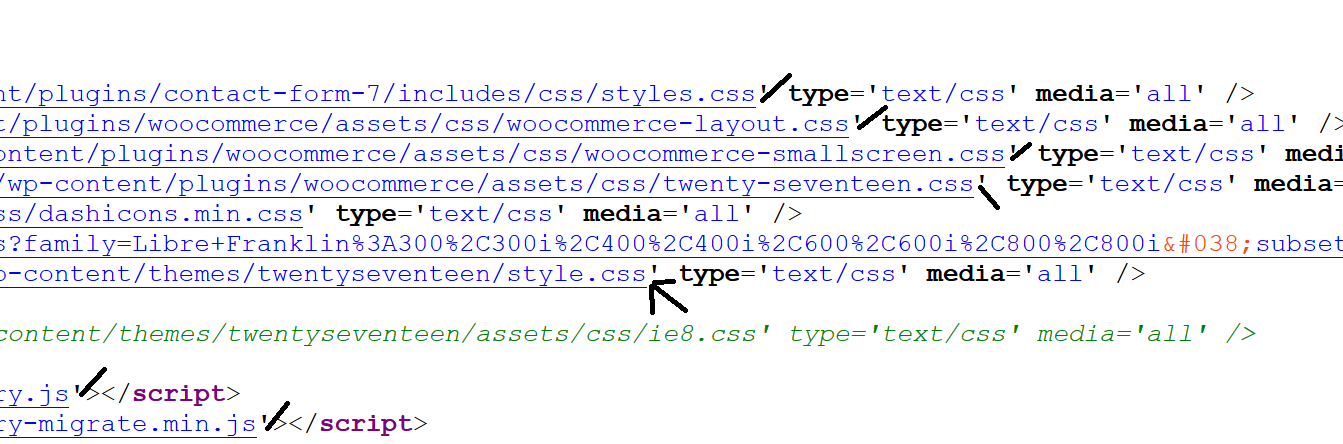
By default, WordPress appends version parameters to static resource URLs — for example:
https://example.com/style.css?ver=6.6
While this helps with cache-busting during development, it prevents proxy servers and CDN networks from properly caching these files, which hurts your website’s performance score.
This plugin strips those query strings, turning URLs like:
https://example.com/style.css?ver=6.6
into clean, cacheable URLs like:
https://example.com/style.css
Why Does This Matter?
Speed is a critical ranking factor for search engines. Tools like Google PageSpeed Insights, GTmetrix, Pingdom, and YSlow flag query strings on static resources as a performance issue. Removing them can:
- ✅ Improve your website performance score
- ✅ Enable better proxy and CDN caching
- ✅ Reduce page load time for returning visitors
- ✅ Contribute to better SEO rankings
- ✅ Improve overall user experience
How It Works
Once activated, the plugin hooks into WordPress’s built-in script_loader_src and style_loader_src filters and silently removes all query string parameters from your local CSS and JS URLs — on the frontend only. The WordPress admin dashboard is never affected.
No setup required. No settings page. Just install, activate, and you’re done.
Features
- Removes all query string parameters from local CSS and JS URLs (not just
?ver) - Safely ignores external resources to avoid breaking third-party scripts and APIs
- Strictly targets files ending in
.cssand.jsto protect dynamic PHP scripts enqueued as styles/scripts - Works automatically on activation — no configuration needed
- Frontend-only — does not affect the WordPress admin area
- Extremely lightweight — zero impact on page generation time
- Compatible with all themes and plugins
Learn more about Query Strings on Wikipedia
Upgrade to Pro
Get even faster load times and more advanced features with Pro!
- Advanced Caching & Compression: Browser Caching with Customizable Cache Durations, GZIP Compression, Cache-Control Headers, Keep-Alive, and ETag Removal.
- Code Minification: Minify CSS, JS, and HTML, plus Delay JavaScript for a massive PageSpeed boost.
- Media & Font Optimization: Lazy Load Images & iFrames, and Google Fonts Optimization.
- Database & Site Health: Database Cleanup, DNS Prefetch, Preload Links, Heartbeat Control, and XML-RPC Disable.
- WooCommerce Ready: Built-in WooCommerce Optimization.
- Settings Admin Page: Easy-to-use interface to manage all features.
- Premium Support & Updates: Get fast, dedicated assistance and regular new features.
انسٽاليشن
There are three ways to install this plugin:
Option 1: Install via WordPress Dashboard (Recommended)
- Go to Dashboard > Plugins > Add New.
- Search for WP Remove Query Strings From Static Resources.
- Click Install Now, then click Activate.
- That’s it — the plugin works immediately, no configuration needed.
Option 2: Upload via WordPress Dashboard
- Download the plugin ZIP file from the WordPress Plugin Repository.
- Go to Dashboard > Plugins > Add New > Upload Plugin.
- Choose the downloaded ZIP file and click Install Now.
- Activate the plugin from the Plugins page.
Option 3: Upload via FTP
- Download and extract the plugin ZIP file.
- Upload the
wp-remove-query-strings-from-static-resourcesfolder to/wp-content/plugins/on your server. - Go to Dashboard > Plugins, find the plugin, and click Activate.
FAQ
-
Does this plugin have a settings page?
-
No. This plugin works automatically as soon as you activate it. There are no settings to configure.
-
Will it affect my WordPress admin dashboard?
-
No. The plugin only runs on the frontend of your website. The admin dashboard is completely unaffected.
-
Which query string parameters does it remove?
-
It removes all query string parameters from CSS and JS URLs — including
?ver=,?v=,?timestamp=, and any other parameters. It is not limited to just?ver=. -
Will this break my website?
-
No. Removing query strings from static resources is a safe and widely recommended performance optimization. Your CSS and JS files will still load correctly.
-
Does it work with caching plugins?
-
Yes. It is compatible with all caching plugins.
-
Will it improve my PageSpeed or GTmetrix score?
-
Yes. Tools like Google PageSpeed Insights, GTmetrix, Pingdom, and YSlow flag query strings on static resources as a performance issue. Removing them helps improve your score.
-
I need support
-
Please open a support topic on the WordPress.org support forum and we will be happy to help.
جائزا
تعاون ڪندڙ & ڊولپرز
“WP Remove Query Strings From Static Resources” اوپن سورس سافٽ ويئر آهي. ھيٺين ماڻھن ھن پلگ ان ۾ حصو ورتو آھي.
تعاون ڪندڙواحد: “WP Remove Query Strings From Static Resources” 1 لوڪل ۾ ترجمو ڪيو ويو آهي. ترجمي ڪندڙن جي مهرباني سندن تعاون لاءِ.
ترجمو ڪريو “WP Remove Query Strings From Static Resources” توهان جي ٻولي ۾.
ڊولپمينٽ ۾ دلچسپي؟
ڪوڊ براؤز ڪريو، چيڪ ڪريو SVN مخزن، يا رڪنيت حاصل ڪريو ڊولپمينٽ لاگ پاران RSS.
لاگ تبدیل ڪريو
2.4
- Added: Strict file extension checking to ensure only
.cssand.jsfiles are processed, protecting dynamic PHP scripts. - Added: Safely ignores external resources to prevent breaking third-party APIs like Google Maps.
- Improved: Internal code structure and reliability.
2.3
- Plugin check issues fixed
- Improved code
2.2
- Fixed: Replaced unsafe
strtok()withexplode()to prevent conflicts with other plugins and WordPress core loops.
2.0
- Improved: Removed unnecessary class property, filter callback now uses local variable
- Improved: Strip all query string parameters (not just ?ver and &ver)
- Improved: Plugin initialised via plugins_loaded hook for correct WP load order
- Added: Requires PHP header (7.4)
- Updated: Requires at least bumped to 5.0
- Updated: Tested up to 7.0
- Fixed: Typos and grammar in readme
- Updated: Readme rewritten for better clarity and SEO
1.8
- Remove additional class
1.7
- Added additional class
1.6
- Tested for WP 6.6
1.5
- Tested for WP 6.3
1.4
- Compatibility WP 6.0
1.3
- 23 Feb, 2019
- Text improved
- Increase Version
1.2
- 3 July, 2017
- Code improved
1.1
- 3 July, 2017
- Compatibility issue
1.0
- 29 June, 2017
- First Release