
Skip to content
WordPress.org

سنڌي

  • ٿيمون
  • پلگ ان
  • سھائتا
    • Documentation
    • Forums
  • بابت
  • Source Code
  • Contact
  • Get WordPress
Get WordPress
WordPress.org

Plugin Directory

Social Media Widget

  • Submit a plugin
  • My favorites
  • Log in
  • Submit a plugin
  • My favorites
  • Log in

ھي پلگ ان WordPress جي جديد 3 وڏين رليزز سان آزمايو نه ويو آھي. اهو ٿي سگهي ٿو وڌيڪ برقرار يا سپورٽ نه ٿي سگهي ۽ ٿي سگهي ٿو مطابقت جا مسئلا جڏهن ورڈپریس جي وڌيڪ تازي ورزن سان استعمال ڪيو وڃي.

Social Media Widget

کان: ashirbad.cs
ڊائون لوڊ ڪريو
  • تفصيل
  • جائزو
  • تنصيب
  • ترقي
سھائتا

وضاحت

Easily create beautiful social media link with the install of this plugin.This widget takes a simple, extendable approach for displaying your social media profiles on wordpress website.

Social Media Widget

*Social media widget which let’s you add icons for Facebook, Twitter, Google+, Pinterest.

This plugin helps you add social Profiles to your wordpress Website .

تصوير
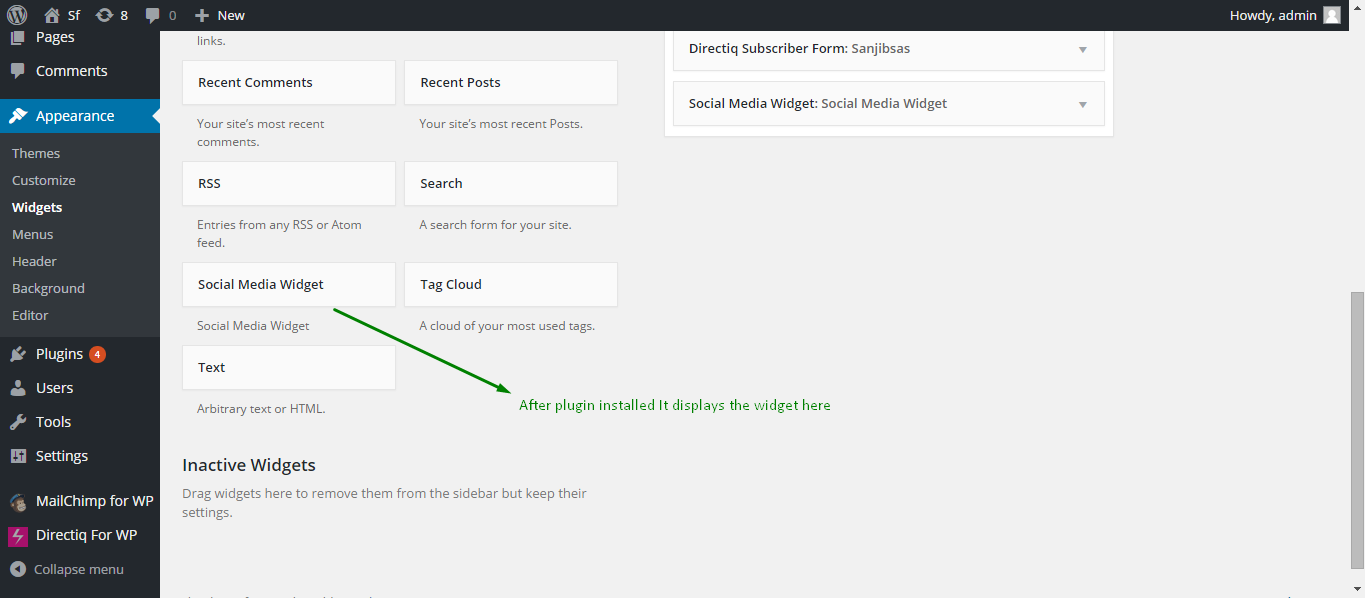
  • Social Media Widget Display
  • Social Media Widget setup

انسٽاليشن

Installing the plugin

  1. In your WordPress admin panel, go to Plugins > New Plugin, search for Social Media Widget and click “Install now“
  2. Alternatively, download the plugin and upload the contents of social-media-widget.zip to your plugins directory, which usually is `/wp-content/plugins/.
  3. Activate the plugin.
  4. Set social Link Url to the widget.

Configuring Social Media Widget

  1. Go to *Social media widget Widget In Apperance->widget -> Sidebar/Footer Widget Section
    2.Change the Widget Name For displaying in the website.

FAQ

Where can I find social Media Widget?

Go to Appearance > Widgets and use the Social Media Widget** widget that comes with the plugin.

How to display a form in widget areas like the sidebar or footer?

1.Go to Appearance > Widgets and use the Social Media Widget** widget that comes with the plugin.
2. Go to *Social media widget Widget In Apperance->widget -> Sidebar/Footer Widget Section

جائزا

Works perfectly

bithikapadhi 2 جُولاءِ 2018
Nice one. I really like this plugins ,because its very easy to use.

Works perfectly

Maiboell74 3 سيپٽمبر 2016
Just works perfectly! Thanks

Nice Plugin

jeebandeep 3 سيپٽمبر 2016
Its very user friendly. Simple ease of access.

Nice Plugin

rakesh mohanta 3 سيپٽمبر 2016
It’s working like a charm. Keep up the good works 🙂

Good!

robesv 3 سيپٽمبر 2016
Thanks for the really simple plugin. It does what it promises. I’ll love to have also a link for those who want to send me an e-mail.
جمع: سڀ 5 تبصرا پڙهو

تعاون ڪندڙ & ڊولپرز

“Social Media Widget” اوپن سورس سافٽ ويئر آهي. ھيٺين ماڻھن ھن پلگ ان ۾ حصو ورتو آھي.

تعاون ڪندڙ
  • ashirbad.cs

ترجمو ڪريو “Social Media Widget” توهان جي ٻولي ۾.

ڊولپمينٽ ۾ دلچسپي؟

ڪوڊ براؤز ڪريو، چيڪ ڪريو SVN مخزن، يا رڪنيت حاصل ڪريو ڊولپمينٽ لاگ پاران RSS.

لاگ تبدیل ڪريو

1.0.0 – septmber 11, 2015

ميٽا

  • Version 1.0
  • Last updated 10 سالَ اڳ
  • Active installations 400+
  • WordPress version 4.0.1 يا وڌيڪ
  • Tested up to 4.3.34
  • Language
    English (US)
  • Tags
    sidebarsocialsocial followsocial links
  • ترقي يافته ڏيک

درجه بندي

5 out of 5 stars.
  • 5 5-star reviews 5 stars 5
  • 0 4-star reviews 4 stars 0
  • 0 3-star reviews 3 stars 0
  • 0 2-star reviews 2 stars 0
  • 0 1-star reviews 1 star 0

منهنجي راءِ شامل ڪريو

See all reviews

تعاون ڪندڙ

  • ashirbad.cs

سھائتا

چوڻ لاءِ ڪجهه آهي؟ مدد گهرجي؟

ڏسو سپورٽ فورم

عطيو

ڇا توھان ھن پلگ ان جي ترقي ۾ مدد ڪرڻ چاھيو ٿا؟

هن پلگ ان ڏانھن مدد ڪريو

  • About
  • News
  • Hosting
  • Privacy
  • Showcase
  • Themes
  • Plugins
  • Patterns
  • Learn
  • Support
  • Developers
  • WordPress.tv ↗
  • Get Involved
  • Events
  • Donate ↗
  • Five for the Future
  • WordPress.com ↗
  • Matt ↗
  • bbPress ↗
  • BuddyPress ↗
WordPress.org
WordPress.org

سنڌي

  • Visit our X (formerly Twitter) account
  • Visit our Bluesky account
  • Visit our Mastodon account
  • Visit our Threads account
  • Visit our Facebook page
  • Visit our Instagram account
  • Visit our LinkedIn account
  • Visit our TikTok account
  • Visit our YouTube channel
  • Visit our Tumblr account
ڪوڊ شاعري آهي.