وضاحت
This plugin lets you increase or decrease paragraph indentation by pressing Tab or Shift+Tab in the Gutenberg editor.
From version 1.1.0, indentation inside the editor is represented by a simple <tab> × N badge — ensuring clean, theme-independent preview — while the actual indentation remains visible on the front end.
FAQ Check on the site.
https://it-libero.com/en/en-us/download/indent-paragraph-with-tab/
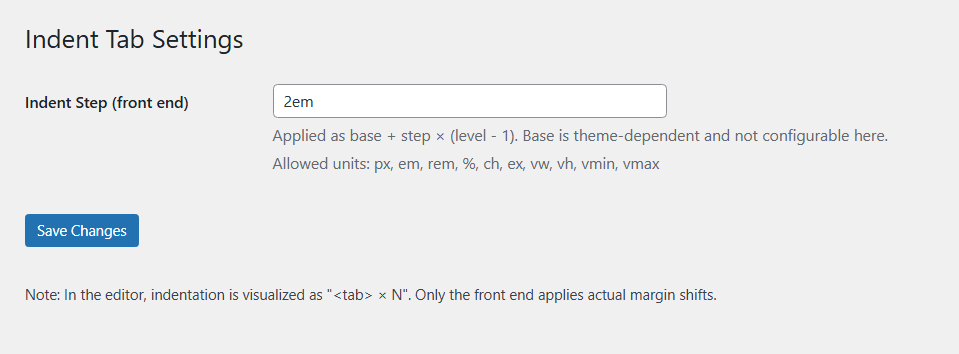
Settings
You can change the indentation value.
1. Admin Settings > Indent Tab
2. Indent Step input
تصوير
جائزا
ھن پلگ ان لاءِ ڪي به رايا ناھن.
تعاون ڪندڙ & ڊولپرز
“Indent Paragraph with Tab” اوپن سورس سافٽ ويئر آهي. ھيٺين ماڻھن ھن پلگ ان ۾ حصو ورتو آھي.
تعاون ڪندڙ
ترجمو ڪريو “Indent Paragraph with Tab” توهان جي ٻولي ۾.
ڊولپمينٽ ۾ دلچسپي؟
ڪوڊ براؤز ڪريو، چيڪ ڪريو SVN مخزن، يا رڪنيت حاصل ڪريو ڊولپمينٽ لاگ پاران RSS.
لاگ تبدیل ڪريو
1.1.1
- Security: added sanitize_callback for options (
ipwt_base,ipwt_step) with a strict CSS unit whitelist. - Hardening: inline CSS now uses validated values only; invalid input is discarded.
- Admin UI: clarified settings descriptions and documented allowed units.
1.1.0
- Added visual
<tab> × Nbadge preview in editor. - Removed editor-side indentation shifting to avoid theme conflicts.
- Front-end rendering unchanged.
1.0.1
- Initial stable release.