Skip to content
WordPress.org

سنڌي

  • ٿيمون
  • پلگ ان
    • Documentation
    • Forums
  • بابت
  • Source Code
  • Contact
  • Get WordPress
Get WordPress
WordPress.org

Plugin Directory

WP ShareX

  • Submit a plugin
  • My favorites
  • Log in
  • Submit a plugin
  • My favorites
  • Log in

ھي پلگ ان WordPress جي جديد 3 وڏين رليزز سان آزمايو نه ويو آھي. اهو ٿي سگهي ٿو وڌيڪ برقرار يا سپورٽ نه ٿي سگهي ۽ ٿي سگهي ٿو مطابقت جا مسئلا جڏهن ورڈپریس جي وڌيڪ تازي ورزن سان استعمال ڪيو وڃي.

WP ShareX

کان: joomdev
ڊائون لوڊ ڪريو
  • تفصيل
  • جائزو
  • تنصيب
  • ترقي
سھائتا

وضاحت

WP ShareX is an advanced WordPress Social Share plugin enables you to add social share buttons on Posts and pages. You can assign buttons on Top of the Content, Bottom of the Content, Sidebar and on media.

Features of WP Social Share by JoomDev
1. 24 Social Network
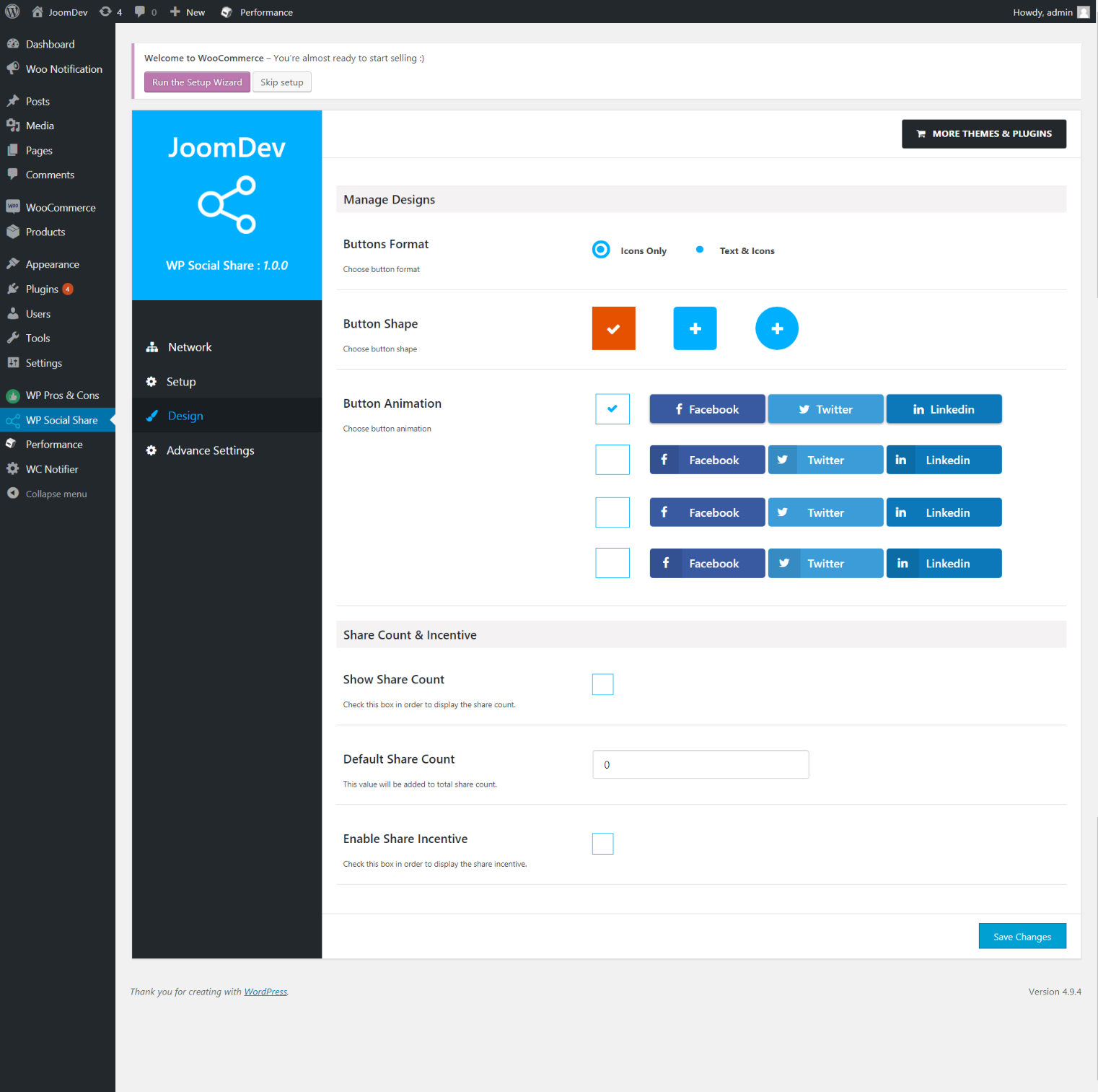
2. You have the option to select either Icons or Icons with Text
3. 3 Button Shapes
4. 4 Button Animations
5. URL Shortening Option with Bitly and Goo.gl
6. Embed Twitter Handle and desired tags with Tweet
7. 4 Button display Location e.i. Top of the Content, Bottom of the content, Media, and Sidebar
8. Hide On Mobile Ability
9. Default Share Count Option. (You can play with your user’s mind)
10. Encourage your Audience to share your content with Share Incentive Feature

تصوير
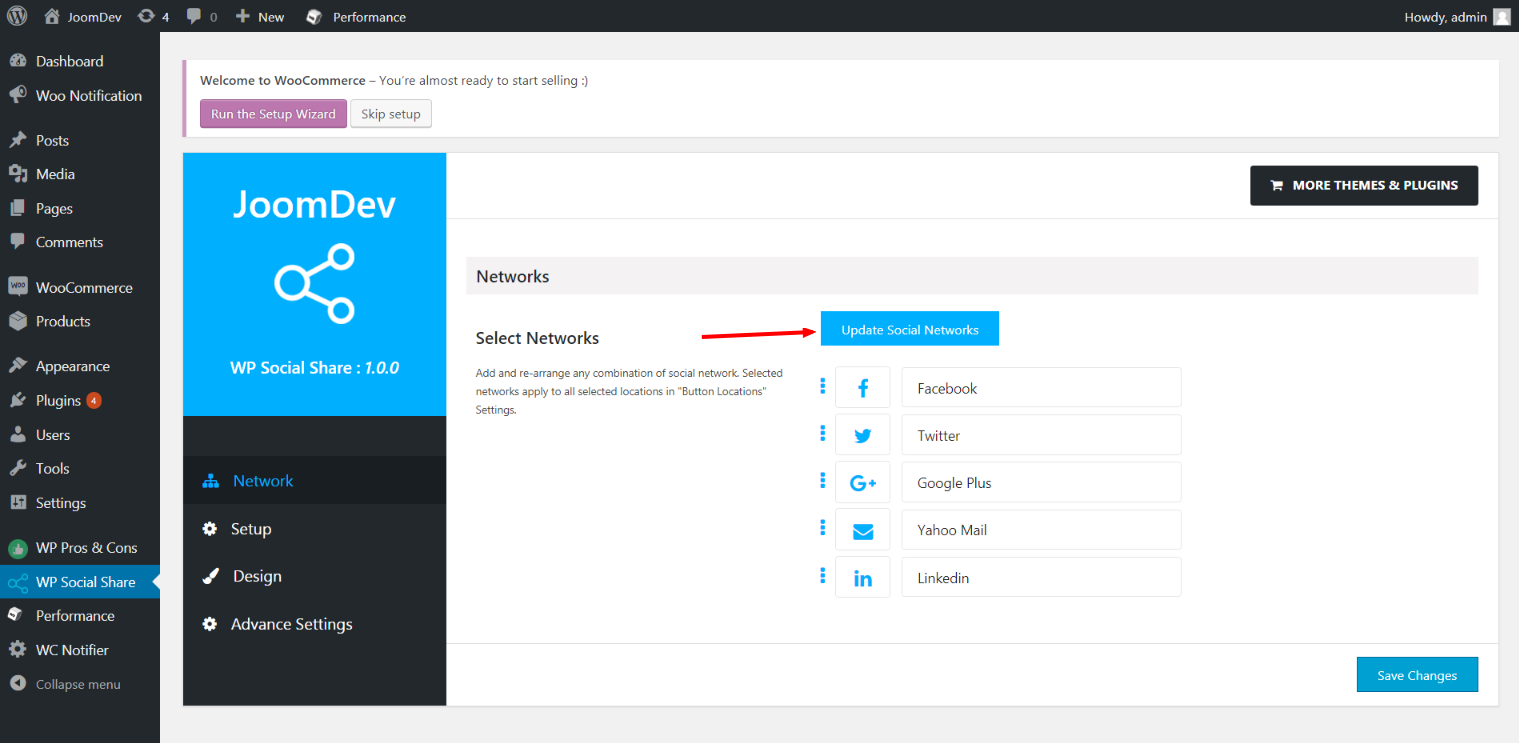
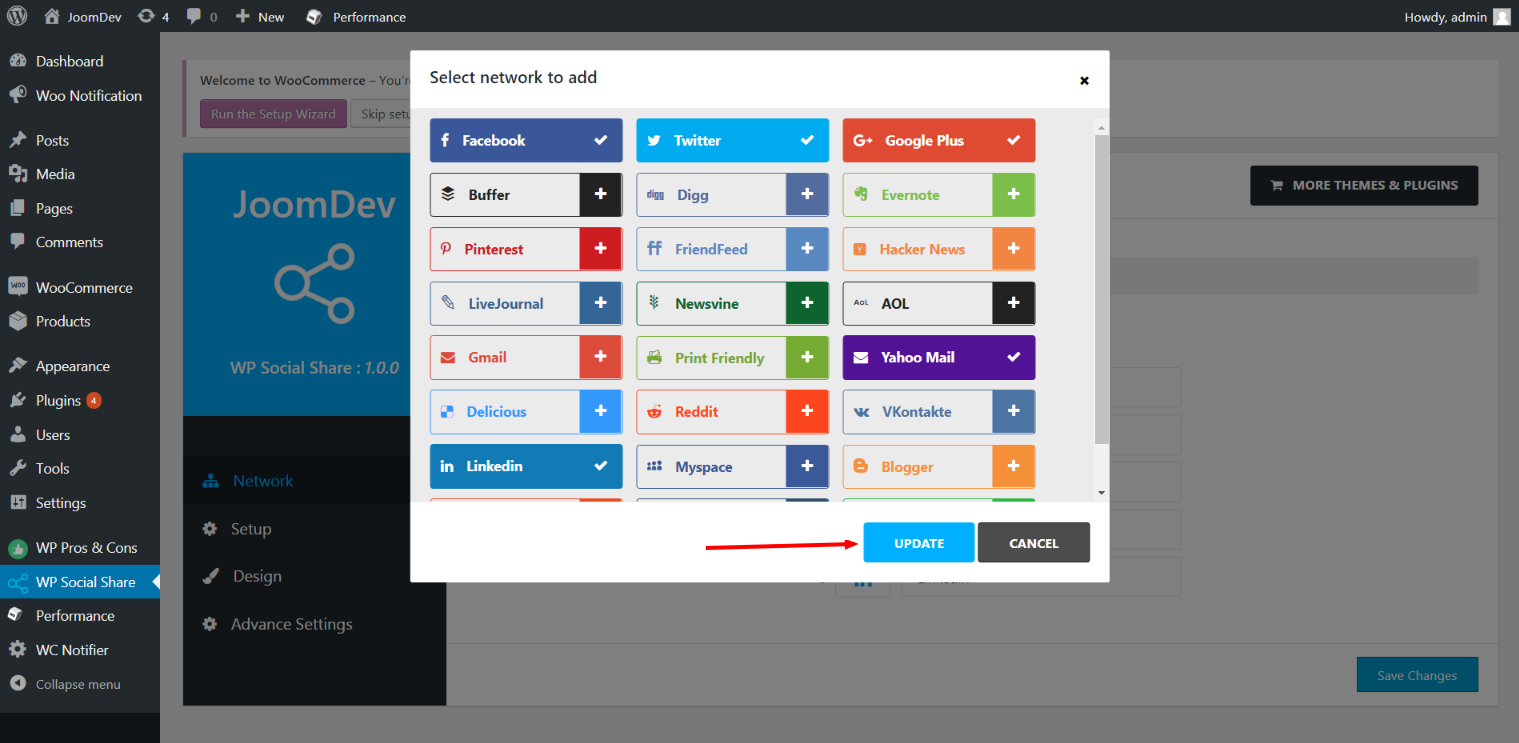
  • Click here to select networks
  • Update networks after selecting them.
  • Setup plugin and api settings.
  • Select any design to display the buttons.
  • For mobile

انسٽاليشن

Way 1:
1. Upload joomdev-wp-social-share.zip to the /wp-content/plugins/ directory
2. Extract the zip file.
3. Activate the plugin from wordpress plugins page. And you have done.

Way 2:
1. Go to plugins page in admin.
2. Click on Add New button.
3. Search for “WP ShareX”.
4. Click install on WP Social Share.
5. Activate the plugin.

FAQ

Installation Instructions

Way 1:
1. Upload joomdev-wp-social-share.zip to the /wp-content/plugins/ directory
2. Extract the zip file.
3. Activate the plugin from wordpress plugins page. And you have done.

Way 2:
1. Go to plugins page in admin.
2. Click on Add New button.
3. Search for “WP ShareX”.
4. Click install on WP Social Share.
5. Activate the plugin.

How do I use this plugin?

See description.

جائزا

Excellent!

Arnab Mohapatra 16 مارچ 2018 1 reply
Incredible plugin. It allows to add any sharing button on the page simply and fast!
واحد: سڀ 1 جائزو پڙهو

تعاون ڪندڙ & ڊولپرز

“WP ShareX” اوپن سورس سافٽ ويئر آهي. ھيٺين ماڻھن ھن پلگ ان ۾ حصو ورتو آھي.

تعاون ڪندڙ
  • joomdev

ترجمو ڪريو “WP ShareX” توهان جي ٻولي ۾.

ڊولپمينٽ ۾ دلچسپي؟

ڪوڊ براؤز ڪريو، چيڪ ڪريو SVN مخزن، يا رڪنيت حاصل ڪريو ڊولپمينٽ لاگ پاران RSS.

لاگ تبدیل ڪريو

1.0.0

  • New Plugin initialized.

ميٽا

  • Version 1.0.0
  • Last updated 8 سالَ اڳ
  • Active installations 10+
  • WordPress version 3.0 يا وڌيڪ
  • Tested up to 4.9.29
  • Language
    English (US)
  • Tags
    sharesocialsocial share
  • ترقي يافته ڏيک

درجه بندي

5 out of 5 stars.
  • 1 5-star review 5 stars 1
  • 0 4-star reviews 4 stars 0
  • 0 3-star reviews 3 stars 0
  • 0 2-star reviews 2 stars 0
  • 0 1-star reviews 1 star 0

Your review

See all reviews

تعاون ڪندڙ

  • joomdev

سھائتا

چوڻ لاءِ ڪجهه آهي؟ مدد گهرجي؟

ڏسو سپورٽ فورم

عطيو

ڇا توھان ھن پلگ ان جي ترقي ۾ مدد ڪرڻ چاھيو ٿا؟

هن پلگ ان ڏانھن مدد ڪريو

  • About
  • News
  • Hosting
  • Privacy
  • Showcase
  • Themes
  • Plugins
  • Patterns
  • Learn
  • Support
  • Developers
  • WordPress.tv ↗
  • Get Involved
  • Events
  • Donate ↗
  • Five for the Future
  • WordPress.com ↗
  • Matt ↗
  • bbPress ↗
  • BuddyPress ↗
WordPress.org
WordPress.org

سنڌي

  • Visit our X (formerly Twitter) account
  • Visit our Bluesky account
  • Visit our Mastodon account
  • Visit our Threads account
  • Visit our Facebook page
  • Visit our Instagram account
  • Visit our LinkedIn account
  • Visit our TikTok account
  • Visit our YouTube channel
  • Visit our Tumblr account
ڪوڊ شاعري آهي.
The WordPress® trademark is the intellectual property of the WordPress Foundation.